OpenClaw is described as an AI agent on the homepage. That's accurate, but the word "agent" gets stretched across so many products right now that it's almost meaningless on its own. Here's what it actually means for OpenClaw specifically.
How an OpenClaw agent differs from a chatbot
A standard chatbot reads your message, calls an AI API, and returns text. That's the full loop. No memory of last week's conversation, no ability to look something up, no way to take action beyond writing a response.
OpenClaw works differently. The gateway process runs on a server continuously. When you send a message, the process receives it, decides whether to invoke any tools, and then generates a response informed by what it found. It's routing messages through a system that can act — not just handing them off to an API.
A chatbot can tell you what it knows about tomorrow's weather. An OpenClaw agent can look it up.
For a broader comparison of chatbots and what OpenClaw provides on top, see What Is a Chatbot? OpenClaw Explained.
The three parts of an OpenClaw agent
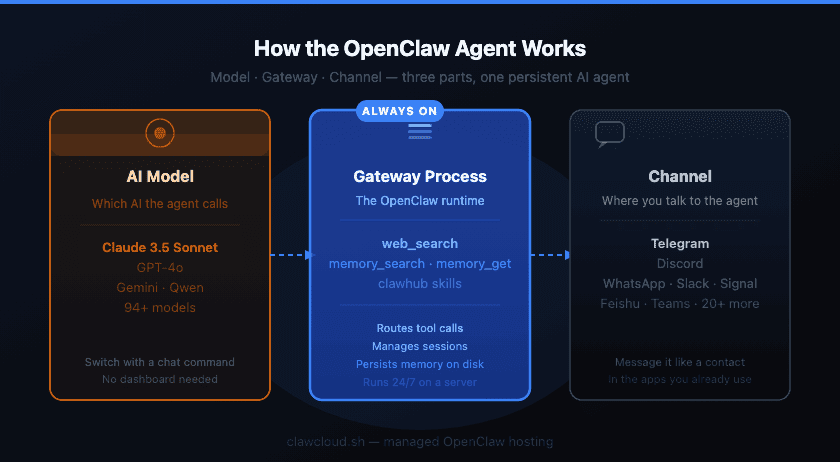
Every agent has three components that have to work together:
The model — the AI the agent calls. Claude, GPT-4o, Gemini, Qwen, and many more are supported. You set this in ~/.openclaw/openclaw.json and can switch models with a command from inside the chat, without touching the config file again.
The channel — where the agent listens and responds. OpenClaw supports 20+ channels, including Telegram, Discord, WhatsApp, Slack, Signal, Feishu, and more. The channel is how you actually talk to the agent.
The gateway process — the server-side runtime that ties model and channel together. It manages sessions, routes tool calls, and handles everything between your message arriving and a response going out. This process running continuously is what makes the agent persistent.
What tools the agent has access to
This is where "AI agent" stops being a buzzword and becomes a functional description.
web_search — the agent can search the web and read the content of pages, then use what it finds when writing a response. It's not returning a list of links. It's reading the content and reasoning with it.
Memory — OpenClaw stores memory as plain Markdown files on disk: a MEMORY.md file in the workspace, plus dated journal files in a memory/ folder. The files are the source of truth — there's no database or cloud sync layer. memory_search does semantic search across them; memory_get reads a specific file directly. The OpenClaw memory guide covers how this works in detail.
Skills — mini-programs the agent can run when triggered by a command. Install them from the ClawHub registry with clawhub install <skill-slug>. Skills and plugins are different things — a plugin can ship its own skills, but skills work without a plugin. The official skills docs have the full list of available commands.
Running multiple agents on one server
One OpenClaw server can run several agents at the same time. Each agent has its own model, channel, and config block. The multi-agent setup documentation covers how to structure this.
A straightforward setup: a work agent on Slack using Claude 3.5 Sonnet for detailed tasks, and a personal agent on Telegram using a free Qwen model for lightweight use. Two separate agents, one server.
OpenClaw is sometimes confused with forks like MaxClaw or NanoClaw — they're distinct projects with different goals. The OpenClaw vs NanoClaw comparison covers the differences if you're sorting through the options.
Why the server being always-on matters
Persistent memory only works if the process never stops. If the gateway shuts down between conversations, your memory files are still there — but scheduled tasks the agent set won't run, and there's no live session to continue.
Running that server yourself means handling Node.js installation, systemd setup, and gateway configuration before any of the above works. Why self-hosting OpenClaw is harder than it looks covers where that usually breaks down.
ClawCloud manages the server, installation, and upkeep. You connect a channel, pick a model, and the gateway goes live. Memory, tools, and multi-agent all work from day one — no server configuration needed.