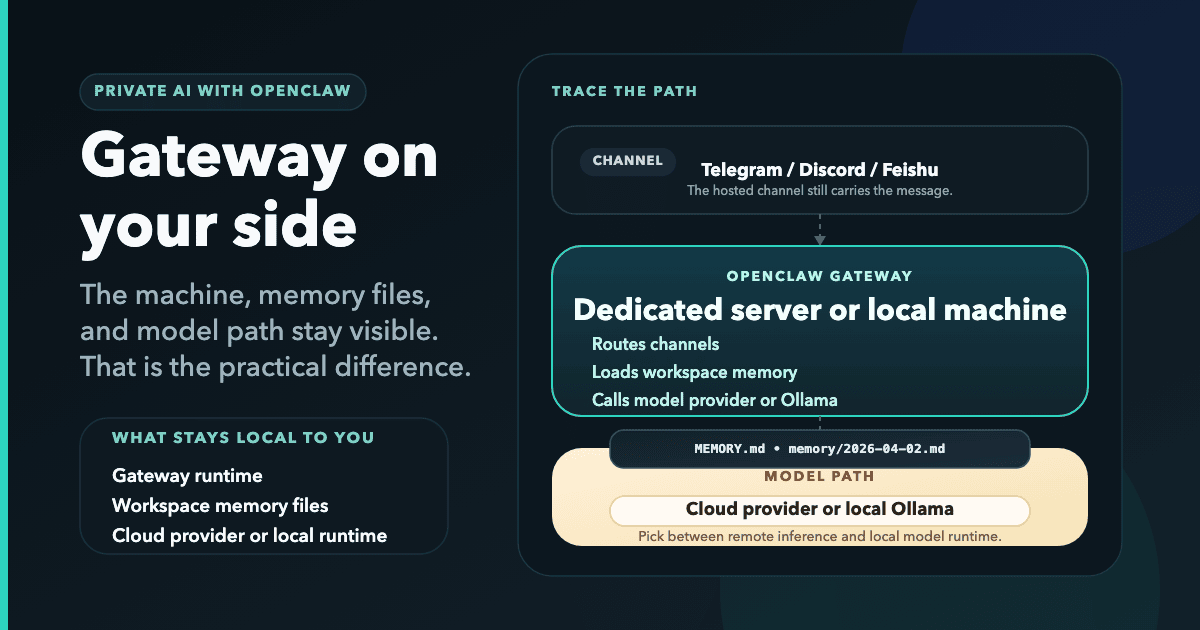
"Private AI" gets used for very different products. For OpenClaw, the useful questions are concrete: where the gateway runs, where memory files live, and which outside services still sit in the path between the message and the model.
The OpenClaw docs describe it as a self-hosted gateway that runs on your own machine or server. The memory docs say the assistant remembers by writing plain Markdown files in the agent workspace. That gives you a practical way to judge privacy claims: check the machine, the files, and the services in the path.
What makes an AI assistant private
For an OpenClaw-style setup, the privacy model gets stronger when:
- The gateway runs on a machine you choose. That can be your laptop, your own VPS, or a dedicated managed instance.
- Memory is stored in workspace files on that machine. OpenClaw documents
MEMORY.mdandmemory/YYYY-MM-DD.mdas the files it uses for durable context. - You choose the channels and model providers that connect to the gateway. The gateway is the control point, not a shared hosted chat product.
That still does not mean nobody else ever sees anything. If you chat through Telegram, Discord, or another hosted channel, that channel still carries the message. If you use a cloud model provider, that provider still receives the prompt. What changes is where the gateway and its memory live.
That is why the phrase is only useful when you tie it to infrastructure, not marketing.
Three setups, three tradeoffs
Run AI locally
You install OpenClaw on your own laptop or home server. The gateway runs on your hardware, and OpenClaw can also use local model runtimes such as Ollama.
Local gives you the highest control. The same machine holds the gateway and the workspace files. The downside is availability: if that machine is off, sleeping, or unreachable, your assistant is too.
Self-hosted VPS
You rent a Linux server and install OpenClaw yourself. That keeps the gateway online 24/7, but Node setup, onboarding, updates, disk usage, and service restarts become your responsibility.
ClawCloud's own self-hosting guide puts a personal OpenClaw VPS at about $4 to $10 per month for the server itself. That is the low-cash option, but it turns uptime and maintenance into your job.
Managed cloud instance
A managed OpenClaw host moves the server work to someone else while keeping the runtime on a dedicated machine for your instance.
ClawCloud is built around that model. Its pricing and FAQ describe one dedicated server per instance, with Linux plans starting at $29/month and Windows at $49/month. You can run in BYOK mode or add managed AI credits.
What OpenClaw does that earns the "private" label
OpenClaw fits the label because the core runtime is not a shared hosted chat app. According to the docs:
- OpenClaw is a self-hosted gateway that runs on your own machine or server.
- The gateway is the single source of truth for sessions, routing, and channel connections.
- Memory lives as plain Markdown files in the agent workspace.
- Channels connect through the gateway, and multiple channels can run at the same time.
In practice, the path looks like this:
- A message arrives from a channel such as Telegram, Discord, or Feishu.
- OpenClaw's gateway receives it and loads the workspace context it needs.
- The gateway either calls a model provider or a local runtime such as Ollama.
- The reply goes back through the same channel.
That keeps the gateway and its memory outside a shared hosted chat app, but it does not remove the other services in the chain. The channel still sees the message, and a cloud model provider still sees the prompt if you use one.
Local AI assistant vs server-based setup
The phrase "local AI assistant" usually refers to running model inference on your own hardware. OpenClaw's Ollama provider docs describe Ollama as a local LLM runtime that can run open-source models on your machine, and OpenClaw can auto-discover those local models.
That matters because it separates two different privacy questions:
- Where the gateway and memory live
- Where model inference happens
If you use OpenClaw with Ollama on the same machine, model inference stays local. If you use OpenClaw with a cloud model, the gateway and memory can still stay on your machine or server, but the prompt still goes to that provider. If you message the assistant through Telegram or Discord, the message also passes through that channel before it reaches the gateway.
Honest tradeoffs
No setup gives you every benefit at once.
Local gives you the strongest control over the machine, but availability is tied to that machine. A self-hosted VPS stays online cheaply, but you own the upkeep. A managed instance costs more than a bare server, but it buys you a dedicated machine, automatic updates, monitoring, and a deploy flow that removes most of the server work.
The cheapest path is still self-hosting. The lowest-maintenance path is managed hosting. The most isolated model path is local inference with Ollama. "Private AI" is really a choice about which tradeoff you care about most.
The fastest path to a private AI assistant
If you want the lowest-maintenance path, use a managed deployment. ClawCloud's deploy flow lets you choose Linux or Windows, pick BYOK or managed credits, and connect one primary channel. The homepage positions the wizard as an under-a-minute setup, and its step-by-step copy says Linux is typically ready in 3 to 5 minutes and Windows in 10 to 15.
If you want the lowest server cost, use the self-hosted VPS route.
If you want the strongest local-control model, run OpenClaw with Ollama on your own machine and accept that availability is tied to that device.
Across all three paths, the main architecture stays the same: OpenClaw is the gateway, the workspace files are the memory, and the real difference is where that gateway runs and who operates the machine.