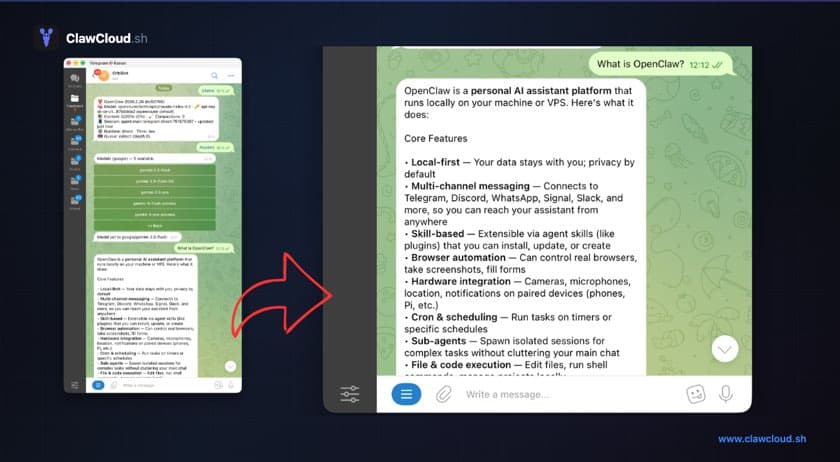
What is a chatbot?
A chatbot is a program you talk to through a messaging interface. You send a message, it sends one back.
The older generation were scripted — they matched keywords and returned pre-written answers. If you've ever yelled at an automated phone menu, you've met one. Modern AI chatbots are different. They're language models that generate responses to whatever you say, in a conversational way.
The most well-known example right now is ChatGPT. You type a question, it answers. You follow up, it builds on the previous exchange.
AI chatbot vs. AI assistant in your messaging app
There's a meaningful difference between an AI chat interface (like ChatGPT on a website) and an AI chatbot that lives in your existing messaging app.
ChatGPT lives on a website. You have to open it, log in, and switch contexts every time you want to use it. Most people already have Telegram or Discord open all day.
An AI chatbot running in those apps is different — you message it like a contact, wherever you already are. OpenClaw is the software that makes this work. It connects an AI model to a messaging channel and handles everything in between.
What the best AI chatbot actually gives you
When you use ChatGPT or Claude through their official interfaces, you're on a shared service. Your conversations pass through their infrastructure, and you're limited to whatever model they choose to expose that month.
Running your own changes a few things:
Model choice. Pick from Anthropic, OpenAI, Google, and more — including free models from multiple providers. You're not locked into one product's offerings.
No shared rate limits. Your instance only serves you. No competition for response speed during peak hours, no daily message caps.
Configurable behavior. You can set a system prompt that shapes how the bot responds by default. A terse technical helper, a customer service tone, a personal assistant voice — one change applies everywhere.
What OpenClaw actually is
OpenClaw is open-source software that connects an AI model to a messaging channel. The gateway runs on a server, manages conversation sessions, routes messages to the API, and streams responses back to your chat app.
It supports Anthropic, OpenAI, Google, and many more providers, plus a growing list of free models. On ClawCloud managed mode, that currently means curated models including Claude, GPT, Gemini, DeepSeek, Mistral, Llama, Grok, Qwen, and more. You switch models with a single command from inside the chat — no dashboard required.
The free AI chatbot question
A common question is whether you can use OpenClaw for free. The honest answer: OpenClaw includes free models from several providers, so AI usage itself can cost nothing depending on which model you pick. The server that runs the bot is not free — that's where ClawCloud comes in.
If you're evaluating "free AI chatbot" options, the relevant question is what you're actually paying for. Shared tools like ChatGPT's free tier have message caps and no model control. A managed OpenClaw instance has predictable monthly cost and no per-message limits beyond your AI credit allowance.
How ClawCloud makes running OpenClaw practical
Running OpenClaw yourself requires a server, Node.js, configuration files, API keys, and some patience for debugging. Most people hit issues within the first hour — see why self-hosting is harder than it looks.
ClawCloud handles all of that. You pick a plan, connect your Telegram or Discord bot token, choose a model, and the server is provisioned automatically. The bot is live in under a minute.
Plans start at $29/month. Bring your own API key or add the managed AI credits addon to start using the bot immediately without setting up a separate provider account.