ClawCloud now provisions Windows cloud servers for OpenClaw, alongside the existing Linux offering. If the terminal-first setup was the reason you hadn't deployed yet, this removes that barrier.
What shipped
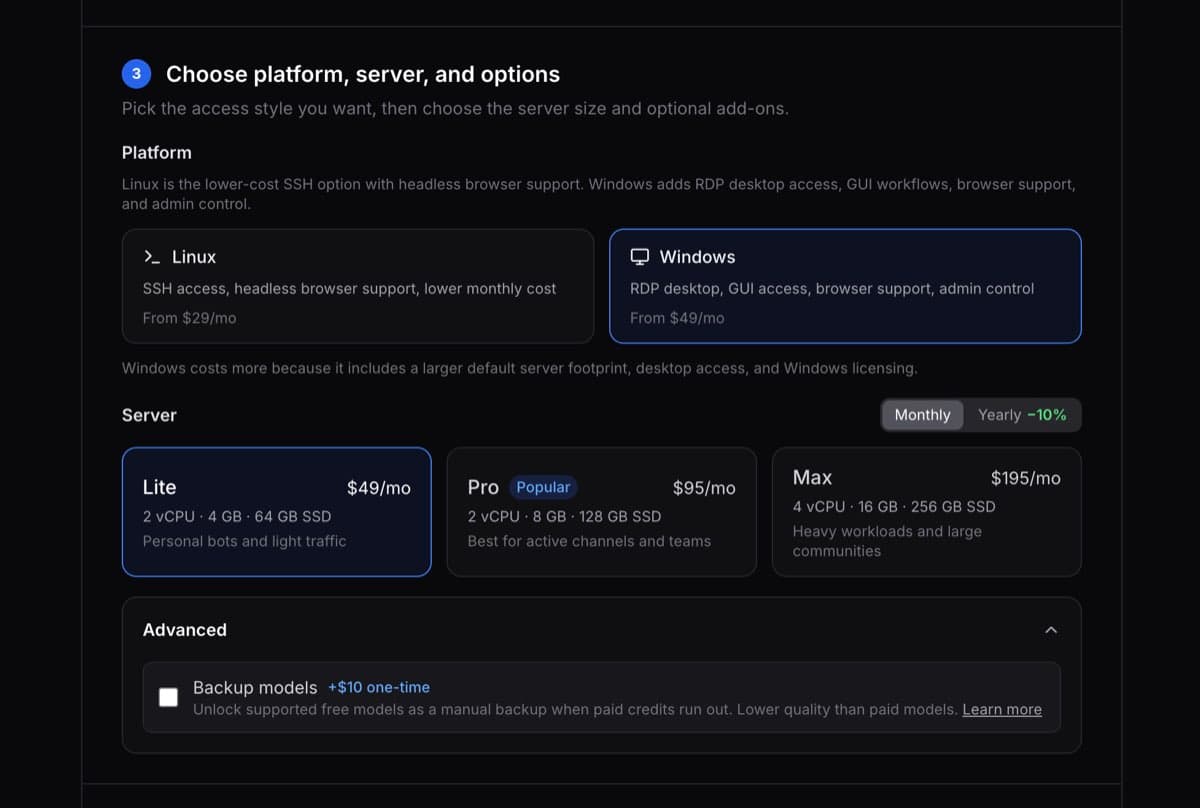
Windows is now a platform choice in the deploy wizard. The flow is the same three-step wizard but the result is different. Instead of a headless Linux server you access over SSH, you get a dedicated Windows Server 2025 instance with a full desktop accessible via RDP.
One thing worth clarifying: setting up WSL2 or self-hosting OpenClaw on a local Windows machine is a different path entirely. This isn't that. It's a dedicated cloud server with no WSL setup, no local Node.js installs, and nothing to maintain on your own machine.
What you get
Windows cloud servers on ClawCloud come fully provisioned:
- Full desktop via RDP. Connect from any OS using Microsoft Windows App — available for Mac, Windows, iOS, and Android. The RDP connection guide walks through setup on each platform.
- Chrome pre-installed. Useful for testing browser interactions the bot makes, opening dashboard tools, or running web-based tasks right from the server.
- Admin access. You have full control of the server to install what you need.
- Telegram, Discord, and Feishu. Same channels, same configuration flow, same dashboard you already know.
OpenClaw is running before you connect. The gateway starts automatically, your channel is configured, and the bot is live. The Windows desktop is the management surface, not the setup environment.
Who this is for
Linux is still the right default if you're comfortable with SSH and want a lower starting price. Nothing about the Linux offering changed.
Windows is a better fit if you:
- Prefer a real GUI and want to avoid terminal work
- Need browser sessions or desktop tools running on the server alongside the bot
- Find WSL2 or server setup friction and want something more approachable
- Work on Windows daily and want to stay in a familiar environment
For a full side-by-side breakdown of features and tradeoffs, see the OpenClaw Linux vs Windows comparison.
How to deploy
- Go to clawcloud.sh/deploy
- Choose your channel (Telegram, Discord, or Feishu) and paste your token
- Pick an AI model, or enable managed AI credits to skip the API key step
- At the platform step, select Windows and choose a server size — check current pricing
- Complete checkout
Provisioning takes a few minutes. Once ready, your dashboard shows an RDP password. Use Microsoft Windows App or any standard RDP client to connect.
For the full setup walkthrough, see the OpenClaw Windows cloud server guide. OpenClaw's official docs have the full list of supported channels and models if you want to go beyond the deploy wizard defaults.