Not all models behave the same way inside OpenClaw. The issues you hit depend heavily on which model tier you're running. This guide documents the most common failure patterns, grouped by model tier, so you know what to expect before you see it in production.
Free models (:free tier)
Free models available on OpenRouter include openai/gpt-oss-120b:free, meta-llama/llama-3.3-70b-instruct:free, mistralai/mistral-small-3.1-24b-instruct:free, and others. They work well for simple Q&A and casual chat, but several patterns break consistently.
File path guessing
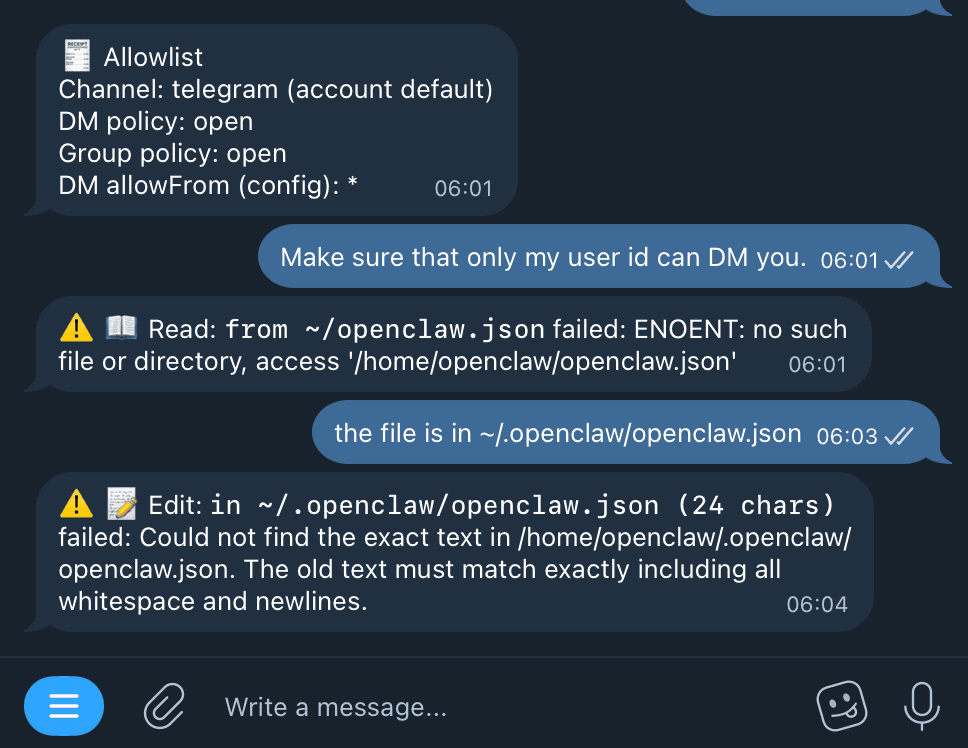
When you ask a free model to read or edit a config file, it may infer the path from general knowledge instead of asking or checking. OpenClaw's config lives at ~/.openclaw/openclaw.json, but free models frequently guess ~/openclaw.json, ~/.config/openclaw.json, or similar — all of which don't exist.
What you see: An error like Read: from ~/openclaw.json failed: ENOENT: no such file or directory.
What to do: After every failed read, tell the bot the exact path explicitly: the file is in ~/.openclaw/openclaw.json. You'll usually need to do this once per session for free models.
Editing without reading first
Free models often skip the read step before attempting an edit. When they do, they construct the edit based on what they assume the file looks like, not what it actually contains. The edit tool requires an exact substring match — so the attempt fails.
What you see: A warning like Edit: in ~/.openclaw/openclaw.json (24 chars) failed: Could not find the exact text in the file.
What to do: Tell the bot to read the file first: read the file first, then make the edit. Stronger models do this automatically; free models need to be prompted.
Limited context retention across steps
Free models can lose track of earlier steps in a multi-step task. A file path you gave two turns ago may be forgotten by the time the model reaches the edit step. Tool results earlier in the conversation may also be ignored.
What to do: Re-state key facts (file location, error message, what was previously tried) at each step rather than relying on the model to remember them.
Inconsistent tool call formatting
Some free models occasionally produce malformed tool invocations — truncated arguments, missing fields, or invalid JSON. OpenClaw's tool runner will catch these and return an error, but the model may loop on retries rather than fixing the underlying call.
What to do: If a tool call loops more than twice with the same error, switch to a stronger model for that task and retry.
Budget models (mid-tier)
Models like google/gemini-2.5-flash-lite, qwen/qwen3-235b-a22b, and openai/gpt-4.1-mini handle file operations reliably. The known issues in this tier are about reasoning depth, not tool mechanics.
Drifting on long instructions
Budget models can lose track of complex multi-part system instructions, especially in long sessions. A bot configured to respond only in a specific tone or with certain constraints may start drifting after many turns.
What to do: Keep system instructions short and concrete. Avoid stacking more than 4-5 behavioral rules in one prompt. If drift happens, /reset to start a fresh context.
Weak on multi-hop reasoning
Tasks that require chaining multiple logical steps — e.g., "look at this log, identify the root cause, and propose the minimal config change to fix it" — can produce shallow answers at this tier. The model may get the first hop right but miss the implication.
What to do: Break multi-hop tasks into explicit steps. Ask for the root cause first, confirm it, then ask for the fix separately.
Code quality in longer functions
For code generation tasks longer than ~50 lines, mid-tier models can lose coherence — correct logic in the first half, subtle bugs or dead branches in the second half.
What to do: Generate code in smaller chunks and verify each section works before continuing.
Premium models
anthropic/claude-sonnet-4, openai/gpt-4.1, google/gemini-2.5-flash, and similar frontier models handle the above cases correctly by default — they read before editing, retain context across long sessions, and follow complex instructions reliably. The known issues here are cost and latency.
Unnecessary tool calls
Premium models sometimes over-verify steps — re-reading a file they already have in context, running a health check they didn't need. This isn't dangerous, but it slows down task completion and uses more tokens.
Higher credits burn on simple tasks
Running a frontier model for tasks like "change my bot's greeting text" or "tell me what model I'm using" costs far more than necessary. Free or budget models cover these cases just as well.
What to do: Use /model gemini-flash or /model gpt-mini for routine tasks, and switch to a premium model only when the task actually requires it. The /model command takes effect immediately without restarting the bot.
Quick reference
| Issue | Free models | Budget models | Premium models |
|---|---|---|---|
| Wrong file path guessing | ⚠️ Common | Rare | No |
| Skips read before edit | ⚠️ Common | Rare | No |
| Context loss across turns | ⚠️ Common | Occasional | No |
| Instruction drift (long sessions) | ⚠️ Common | Occasional | Rare |
| Weak multi-hop reasoning | ⚠️ Significant | Occasional | No |
| Over-verification (extra tool calls) | No | No | Occasional |
| High credit cost for simple tasks | No | Low | ⚠️ High |
When to switch models
- Free → Budget: You're hitting repeated file path or edit errors, or the bot can't complete a 3-step task on its own.
- Budget → Premium: You need reliable output on complex reasoning, long config changes, or detailed code generation.
- Premium → Budget: The task is simple (status check, model switch, greeting change) and credits matter.
Use /model <name> in chat to switch. Session-level only — restarts revert to the config-file model. Persistent dashboard model switching is not live yet, so choose your default model during deploy or reprovision.
Related guides: