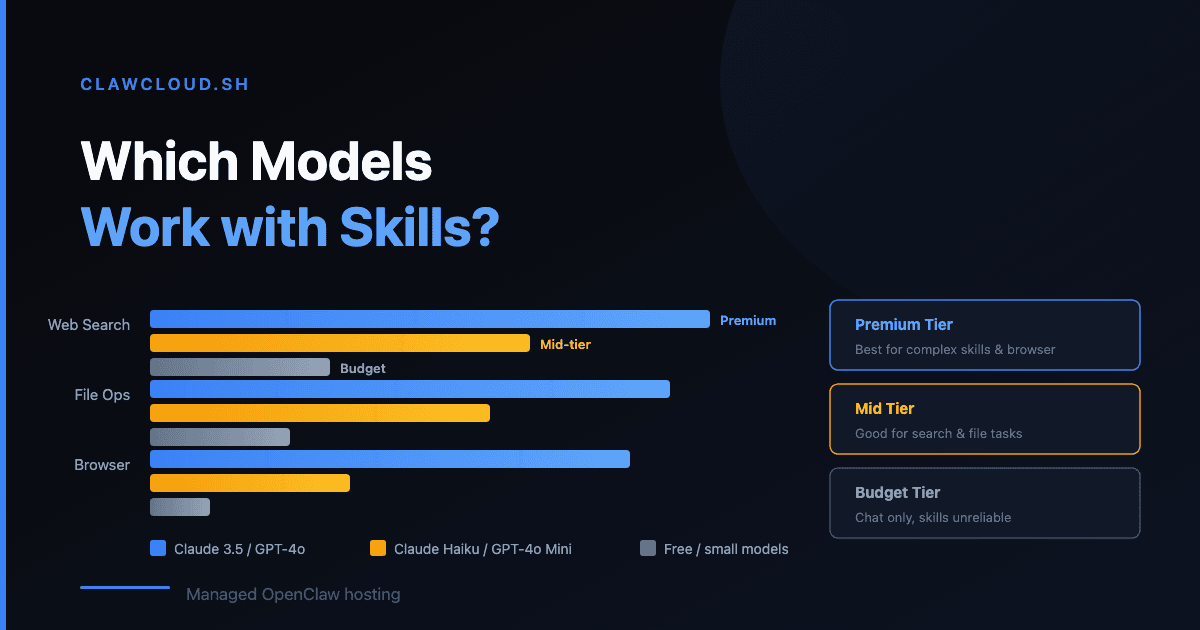
An Ask HN thread this week cut straight to the point: "Strong models like Opus 4.6 do great even with complex skills, but if my provider switches to a smaller model, things just don't hold up." The poster asked whether any smaller models handle skills well, or if self-hosting with Ollama is the only affordable option.
It's a real question, and the answer isn't simple.
Why model choice matters for skills
OpenClaw skills are instructions the AI model follows to use tools — web search, file editing, browser automation, code execution. The model reads the skill's SKILL.md file, decides how to call the tool, interprets the result, and responds.
Smaller models are cheaper per token but struggle with multi-step tool use. They might call the right tool but pass wrong arguments. Or call two tools when three were needed. Or misinterpret the result and give you a confident but wrong answer.
Larger models handle the instruction-following better. They track context across multiple tool calls, recover from partial failures, and know when to ask for clarification versus guessing.
What works at each tier
Based on what ClawCloud users actually run:
Budget models (GPT-4.1 Mini, Gemini 2.5 Flash, Claude Haiku 4.5) — These are the default models on all ClawCloud plans. They handle simple skills well: web search, basic file reads, short conversations. They start to lose accuracy on skills that require 3+ sequential tool calls or need to maintain context across a long chain. Good enough for everyday chat and basic tasks.
Mid-range models (GPT-4.1, Gemini 2.5 Pro, Claude Sonnet 4) — Better at multi-step skills and longer conversations. If you install a skill that needs to search the web, read the result, then write a summary to a file — these models get it right more often. The cost per message is 3-5x higher than budget models.
Premium models (Claude Opus 4.6, GPT-4.5, o3) — These handle complex skills reliably. If you're running data analysis skills, multi-agent workflows, or anything where accuracy on the first try matters, premium models are the tier to use. But they're expensive — a long conversation can cost $1-3.
How ClawCloud credit tiers map to this
ClawCloud's managed credit tiers determine how much AI API usage you get per month:
| Tier | Monthly Price | Credits | Good for |
|---|---|---|---|
| Small | +$13/mo | $8 | Light chat, budget models |
| Medium | +$30/mo | $25 | Daily use, mid-range models |
| Large | +$65/mo | $60 | Heavy use, premium models occasionally |
| XLarge | +$105/mo | $100 | Power users, premium models regularly |
The math: if you use Claude Haiku 4.5 (budget), $8 covers a lot of messages. If you use Claude Opus 4.6 (premium), $8 might last two days of active use.
You can switch models any time with the /model command — aliases like opus, sonnet, haiku, gpt, gemini work. Some users run a budget model for casual chat and switch to a premium model when they need a complex skill to run cleanly. That's a reasonable strategy.
BYOK vs managed: does it matter?
If you bring your own key (BYOK), you pay your provider directly. You get whatever rate your provider offers, with no ClawCloud markup. The trade-off is managing your own spending and key rotation.
With managed credits, ClawCloud handles the provider connection and tracks usage on your dashboard. You see exactly how much you've used and when you'll reset. If you're the kind of person who forgot they had a tab running GPT-4.5 all night, managed credits with a built-in limit might save you money in practice.
For more on how credits work, see Understanding AI Credits. For choosing the cheapest model that still handles your workload, see Choose a Model Without Overpaying. For the full model catalog, see the models page.