If you run OpenClaw daily, model choice is the biggest factor in your monthly AI cost. The goal is simple: use the cheapest model that still handles your real workload.
This guide gives you a practical way to choose, based on current OpenRouter pricing and capability data, then map that choice to ClawCloud plans so you avoid overpaying.
The short answer
For most OpenClaw bots, start with google/gemini-2.5-flash-lite.
Why:
- Very low token pricing on OpenRouter (about $0.10/M input and $0.40/M output)
- 1M context window
- Strong enough for everyday OpenClaw tasks: Q&A, summarization, lightweight automation, and chat support
Sources:
A simple model selection framework
Use this 3-step rule:
- Start with a budget model for all routine traffic.
- Only upgrade for failure cases (complex reasoning, hard coding, long tool-heavy tasks).
- Re-check monthly because model prices and rankings move quickly.
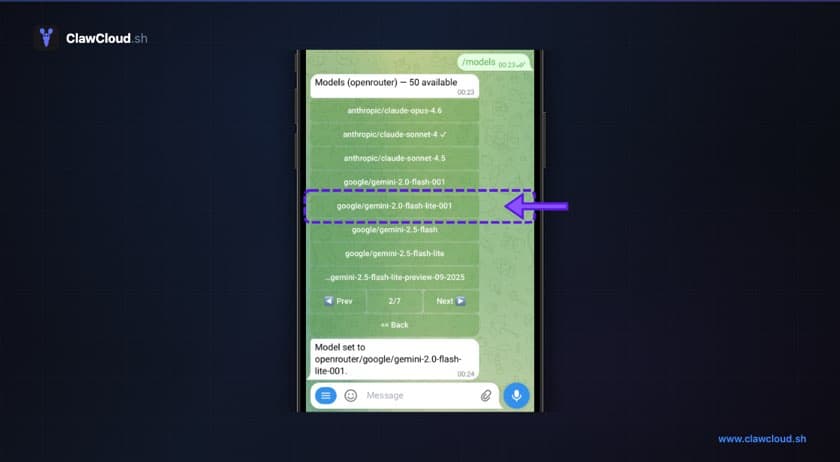
In OpenClaw terms: keep your default on a low-cost model, then switch up with /model only when a task needs more depth.
Cost vs capability: practical options (OpenRouter-supported)
All models below are available on OpenRouter and usable with OpenClaw setups that use OpenRouter.
| Model | OpenRouter price (input / output) | When to use it | Tradeoff |
|---|---|---|---|
google/gemini-2.5-flash-lite | $0.10 / $0.40 per 1M tokens | Best default for high-volume chat and support bots | Lowest cost, lower ceiling on hard reasoning |
qwen/qwen3-235b-a22b | $0.14 / $0.34 per 1M tokens | Strong step-up for harder reasoning and coding at still-low cost | Output is pricier than Flash Lite |
openai/gpt-4.1-mini | $0.40 / $1.60 per 1M tokens | Stable all-rounder when you want stronger instruction following | Higher cost than Qwen/Flash Lite |
google/gemini-2.5-flash | $0.30 / $2.50 per 1M tokens | Better quality for mixed reasoning and coding with low latency | Can burn credits faster on long outputs |
anthropic/claude-haiku-4.5 | $1.00 / $5.00 per 1M tokens | Premium fast model when you need stronger code/reasoning reliability | Expensive for always-on default |
References:
Prices and routing can change. Always verify the live model page before locking defaults.
What this means for OpenClaw workloads
A good default should pass these OpenClaw realities:
- Handles multi-turn chat reliably
- Follows system instructions without drifting
- Responds quickly enough for Telegram/Discord DM flow
- Stays affordable under repeated, short interactions
In practice:
- Use Flash Lite for routine conversational load
- Use Qwen 3 235B when you need better reasoning/coding but still care about spend
- Use GPT-4.1 Mini when you want safer middle-ground quality
- Reserve Haiku 4.5 (or larger frontier models) for specific high-value tasks, not all traffic
How ClawCloud helps you avoid overpaying
This is exactly where ClawCloud’s managed mode helps:
- You get OpenClaw + OpenRouter access in one deployment flow
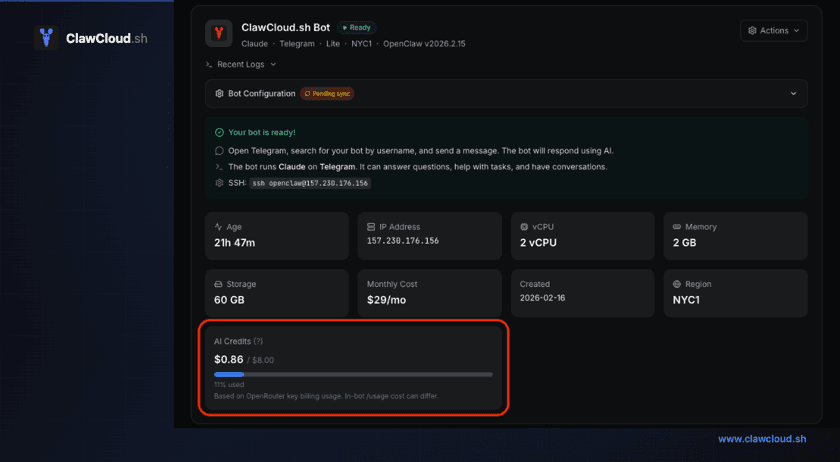
- Add managed AI credits as an addon, or bring your own key
- You can switch models as requirements change, instead of locking into one expensive provider
- If credits are exhausted and Backup Models is enabled, you can switch to a supported free model manually to keep the bot running
Related guides:
- OpenClaw Managed AI on ClawCloud — No API Key Required
- How to Manage OpenClaw AI Credits on ClawCloud
- How to Switch AI Models on Your OpenClaw Bot
Recommended default by ClawCloud plan
A practical starting point:
- Lite ($29):
google/gemini-2.5-flash-lite - Pro ($49):
google/gemini-2.5-flash-liteorqwen/qwen3-235b-a22b - Max ($109):
qwen/qwen3-235b-a22bdefault, with selective upgrades for complex tasks
This gives you the best cost-per-usable-answer for most OpenClaw bots.
Quick setup checklist
- Start with a cheap default model in your OpenClaw setup.
- Monitor quality for one week (failed answers, retries, manual corrections).
- Only promote model tier for the prompts that fail.
- Keep your high-cost model as an exception path, not the default path.
Final recommendation
If your priority is minimizing spend while keeping OpenClaw useful, pick google/gemini-2.5-flash-lite as your baseline and escalate only when a task proves it needs more capability.
That pattern is how most teams get the best outcome: low default cost, selective premium usage, and no lock-in.