The gateway is the process that makes OpenClaw work. It runs on your server, connects to your messaging channels, and routes everything through the AI. No gateway means no responses — even if the model config and API key are correct.
This guide covers what the gateway does, how to get it running as a background service, how to configure authentication, and what to do when it won't start or stay connected.
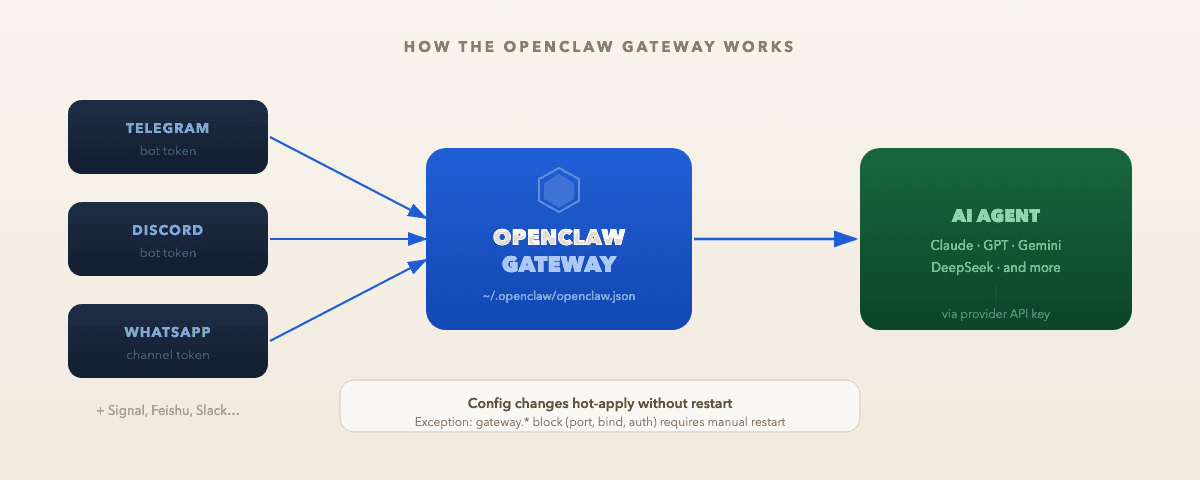
What the OpenClaw gateway does
OpenClaw's gateway is a persistent background process. Once started, it maintains live connections to your configured chat channels and routes messages to the AI agent. All channels — Telegram, Discord, WhatsApp, and any others you configure — run through the same gateway process. There's no separate per-channel service to manage.
The gateway also runs the Control UI at http://127.0.0.1:18789/ by default, so you can chat with your bot in a browser without any channel setup at all.
Config lives at ~/.openclaw/openclaw.json. If that file is missing, the gateway uses safe defaults: loopback-only binding, no auth required, built-in agent with a default model. You only need to touch the config file when you want to change something.
OpenClaw gateway install
The fastest way to get the gateway running as a background service:
curl -fsSL https://openclaw.ai/install.sh | bash
openclaw onboard --install-daemon
The --install-daemon flag registers a user-level service (systemd on Linux, LaunchAgent on macOS) that starts on boot and restarts automatically on crash. Without it, the gateway only runs while a terminal session is open.
After the wizard completes, confirm everything came up:
openclaw dashboard
If the Control UI opens in your browser, the gateway is running.
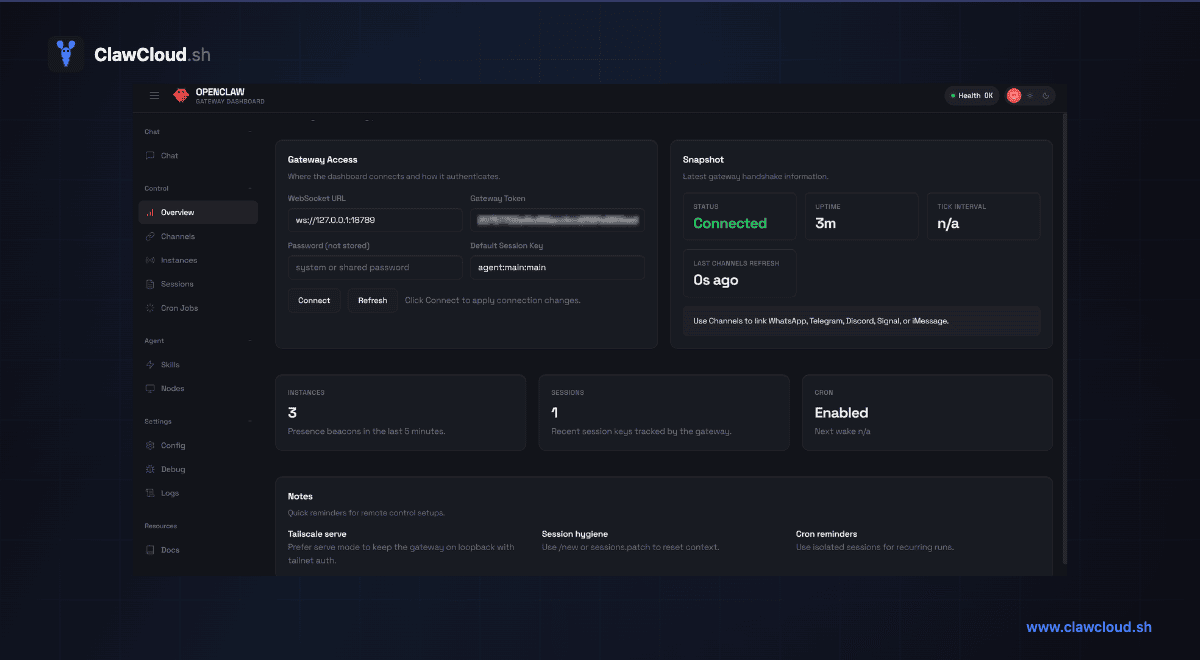
If you're deploying through ClawCloud, the wizard handles install, onboarding, and channel setup for you during the deploy flow. You don't need to run these commands manually.
Checking OpenClaw gateway status
The primary check:
openclaw gateway status
A healthy result shows Runtime: running and RPC probe: ok. If either is missing, the gateway is down or the RPC channel can't reach it.
For a broader diagnostic that covers auth, channels, config, and service registration:
openclaw doctor
openclaw doctor catches config schema errors, missing credentials, port conflicts, and daemon issues in one pass. It's the right first step before digging into raw logs.
To verify that the background service is registered and set to start on boot:
systemctl --user is-enabled openclaw-gateway.service
If this returns enabled, the daemon is registered. disabled or not-found means the service wasn't installed — run openclaw onboard --install-daemon again.
Use systemctl --user for all service management commands. The OpenClaw gateway runs as a user-level service, not a system-level one. Root-level systemctl won't find it.
Configuring the OpenClaw gateway token
The gateway token (gateway.auth.token) is a shared secret that the Control UI and CLI use when authenticating with the gateway. It's optional when the gateway binds only to 127.0.0.1. It becomes required as soon as you bind to a LAN or remote address — the gateway refuses to start without auth on non-loopback binds.
Check the current setting:
openclaw config get gateway.auth.token
To set or update it, use the config wizard:
openclaw configure
Or edit ~/.openclaw/openclaw.json directly:
{
  "gateway": {
    "auth": {
      "mode": "token",
      "token": "${OPENCLAW_GATEWAY_TOKEN}"
    }
  }
}
Store the token value in ~/.openclaw/.env so it doesn't appear as plain text in your config file. Changes to the gateway section require a manual restart — unlike most other config fields, which apply instantly through hot-reload.
See the Gateway Authentication docs for provider API keys (the key your AI model uses) — those are separate from the gateway auth token.
OpenClaw device identity required
If the Control UI shows device identity required, the gateway needs device-level authentication before the connection is allowed. Two situations trigger it:
- You're connecting from a non-localhost address that requires per-device auth
- A previously approved device's credentials have gone stale
Check pending approvals:
openclaw devices list
openclaw devices approve <requestId>
On ClawCloud instances, device identity required errors usually point to gateway auth token drift. Run openclaw doctor first — it will identify the specific block.
Pairing and channel status
The gateway can run without any channel paired. The Control UI works without it, and you can chat with your AI in the browser. But for Telegram, Discord, WhatsApp, and other channels to receive and send messages, each one needs a valid bot token and a completed pairing handshake.
Check channel state:
openclaw channels status --probe
openclaw pairing list --channel telegram
If pairing is stuck or was lost (token revoked, bot deleted), see Fix "Gateway Connect Pairing Required" for the recovery steps per channel.
Troubleshooting
Gateway won't start
openclaw doctor
openclaw logs --follow
Common error signatures:
Gateway start blocked: set gateway.mode=local— add"gateway": { "mode": "local" }to your config (or runopenclaw configureand enable local gateway mode)refusing to bind gateway ... without auth— you're using a non-loopback bind without a token set ingateway.auth.tokenanother gateway instance is already listening— port 18789 is already in use, likely another OpenClaw process
Gateway starts but messages don't come through
A running gateway and working message routing are separate. Check channel policy and pairing state:
openclaw channels status --probe
openclaw config get channels
DM policy restrictions, group mention gating, and missing channel API permissions all produce a healthy gateway with no message flow. See the OpenClaw troubleshooting docs for the full diagnostic runbook.
Restarting the gateway
openclaw gateway restart
If you need to go through systemd directly:
systemctl --user restart openclaw-gateway
Use systemctl --user — the service runs under your user account, not root. Using the root-level systemctl won't find the service and won't affect the running process.
Where config lives
All gateway settings are in ~/.openclaw/openclaw.json. The gateway key controls port, bind address, auth, and reload behavior. Channel tokens live under channels, with one entry per platform.
For the complete field reference, see the Configuration Reference in the OpenClaw docs. For channel-specific config shapes, see OpenClaw Configuration Guide.
Most config changes apply without a restart. The exception is the gateway block itself — port, bind, auth, and TLS changes require a manual restart after saving.
Related guides:
- Fix "Gateway Connect Pairing Required" — recover a disconnected channel
- OpenClaw Configuration Guide — full config file structure and channel setup
- OpenClaw 2026.3.7: Set gateway.auth.mode — auth migration for users upgrading from an older config
- OpenClaw CLI Commands — complete command reference
- OpenClaw docs — official documentation