You need a Feishu App ID and App Secret to deploy an OpenClaw assistant on Feishu. This OpenClaw setup guide walks you through creating a custom app on the Feishu Open Platform and getting to a live bot in about 5 minutes.
If you want a full Feishu bot hosting overview first, start here: OpenClaw Feishu Bot Hosting.
OpenClaw Feishu Bot Setup (Support Terms)
If you searched for openclaw channels add feishu, openclaw add feishu channel, openclaw feishu bot setup, or openclaw feishu bot configuration, this is the canonical setup flow for ClawCloud deployments.
Already have your App ID and App Secret? Jump to Step 8: Deploy on ClawCloud.
What you need before starting
- A Feishu account (or Lark for international tenants)
- Admin access to your Feishu workspace, or permission to create apps
- About 5 minutes to complete setup
Step 1: Open the Feishu Open Platform
Go to the Feishu Open Platform Developer Console (or open.larksuite.com/app for Lark). Sign in with your Feishu account.
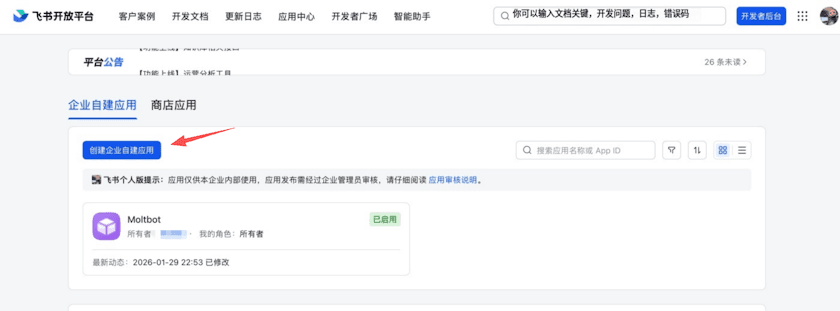
Step 2: Create an enterprise app
Click Create enterprise app. Fill in the required fields:
- App Name — Choose a display name for your bot, such as "AI Assistant" or "Team Helper".
- App Description — A short description of what the bot does.
- App Icon — Upload a profile image (optional but recommended).
Click Create to finish.
Step 3: Copy the App ID and App Secret
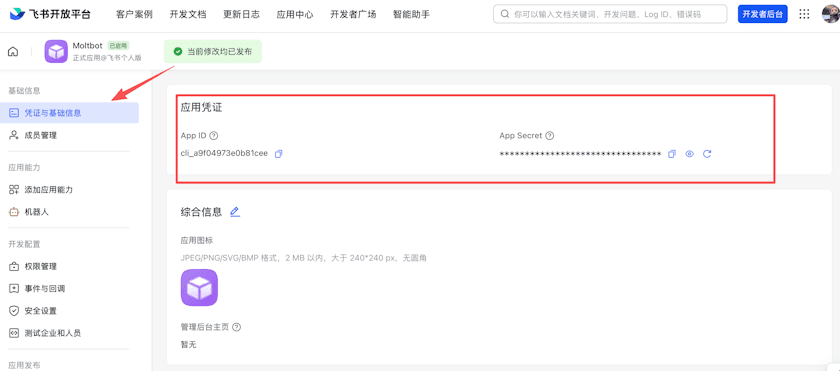
After creating the app, you land on the app's Credentials & Basic Info page. You'll see two values:
- App ID — starts with
cli_, e.g.cli_a1b2c3d4e5f6g7h8 - App Secret — a long alphanumeric string
Copy both values. You'll paste them into the ClawCloud deploy wizard.
Step 4: Configure permissions
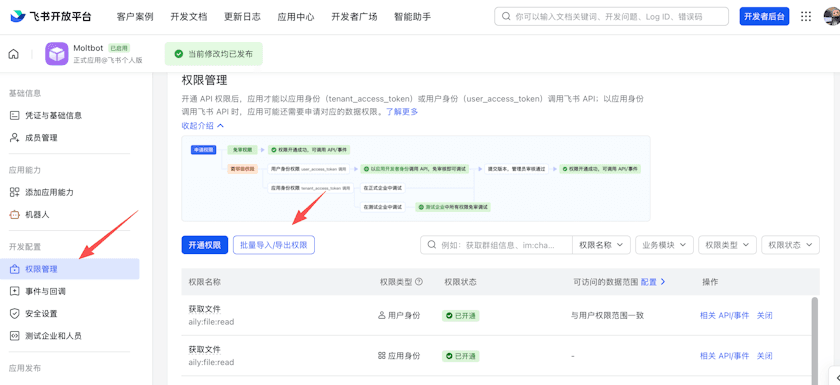
Go to Permissions & Scopes in the sidebar. Click Batch import and paste the full permissions JSON (available in the OpenClaw Feishu docs). This grants the bot the scopes it needs to send and receive messages, handle files, and manage app resources.
Request approval from your workspace admin if required.
Step 5: Enable the bot capability
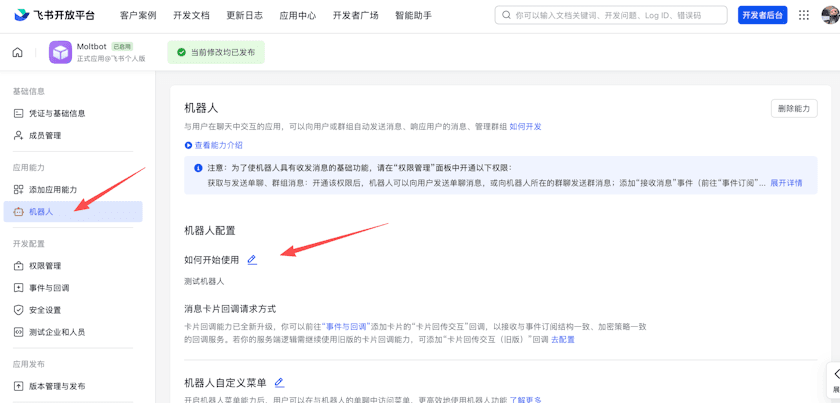
In the left sidebar, go to App Capability → Bot. Enable the bot capability and set the bot name.
Without this, your app can't receive or send messages in Feishu chats.
Step 6: Configure event subscriptions
If you are running a self-managed OpenClaw install (not ClawCloud), add the channel first and confirm the gateway is running:
openclaw plugins install @openclaw/feishu
openclaw channels add
openclaw gateway status
In openclaw channels add, choose Feishu and paste your App ID and App Secret.
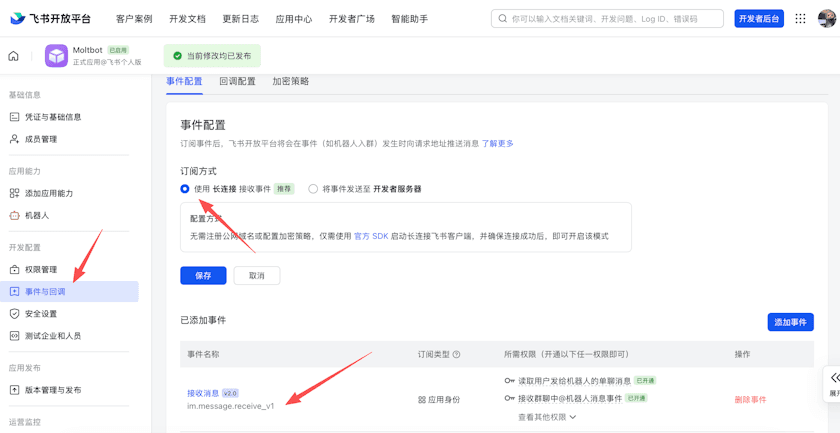
Go to Event Subscriptions in the sidebar and configure:
- Choose Use long connection to receive events (WebSocket)
- Add the event:
im.message.receive_v1
OpenClaw uses a WebSocket long connection, so no public URL or webhook server is required.
Step 7: Publish the app
Go to Version Management & Release and click Create Version. Set a version number (e.g. 1.0.0), write a brief changelog, and submit for review.
For development/testing purposes, your workspace admin can approve the app immediately. For organization-wide rollout, the standard review process applies.
Step 8: Deploy on ClawCloud
Go to the ClawCloud deploy wizard — Feishu will be preselected. Paste your App ID and App Secret into the two input fields. Pick your AI model and click Deploy. Your bot will be live in under a minute.
OpenClaw connects to Feishu via WebSocket (long connection), so there is no public URL or webhook server to configure. The connection is established automatically from your dedicated server.
Step 9: Verify and tune your bot
- Send a DM to your bot and confirm it replies.
- Mention the bot in a group chat and confirm it responds.
- Tune behavior after first deploy with these guides.
- How to Configure OpenClaw Group Chat Behavior
- How to Change the OpenClaw DM Policy
- How to Switch AI Models on Your OpenClaw Bot
Lark (International) users
If you use Lark instead of Feishu, the setup is identical. Create your app at open.larksuite.com/app and use the same App ID and App Secret. OpenClaw detects the Lark domain automatically when configured with domain: "lark" in advanced settings.
Troubleshooting
"openclaw channels add feishu" command not working
The current CLI flow is interactive:
openclaw channels add
Then choose Feishu when prompted. If needed, use the full channel reference in OpenClaw Feishu docs.
"bot open_id resolved: unknown" in logs
This usually means sender identity lookup was incomplete for that event. Check:
- Your app is published (Step 7)
- Event subscription includes
im.message.receive_v1(Step 6) - Permissions were imported and approved (Step 4)
Then send a fresh DM and re-check logs. If messages still fail on a self-managed setup, restart the gateway:
openclaw gateway restart
openclaw logs --follow
Bot not responding after deploy
Make sure you enabled the Bot capability (Step 5) and published the app version (Step 7). Unpublished apps cannot receive messages from users outside the developer console.
Permission denied errors
Check that you added the required scopes in Step 4 and that your workspace admin approved them. Without im:message and im:message:send_as_bot, the bot cannot send or receive messages.
App ID format
The App ID always starts with cli_. If your pasted value does not start with cli_, you may have copied the wrong field.
What to read next
- Deploy an OpenClaw Feishu Bot (use case)
- Run an AI Feishu Bot with OpenClaw (blog)
- OpenClaw CLI Commands: The Complete Reference
- Getting Started with OpenClaw on ClawCloud
- OpenClaw Feishu Bot Hosting
For more details on Feishu channel configuration, see the OpenClaw Feishu documentation.