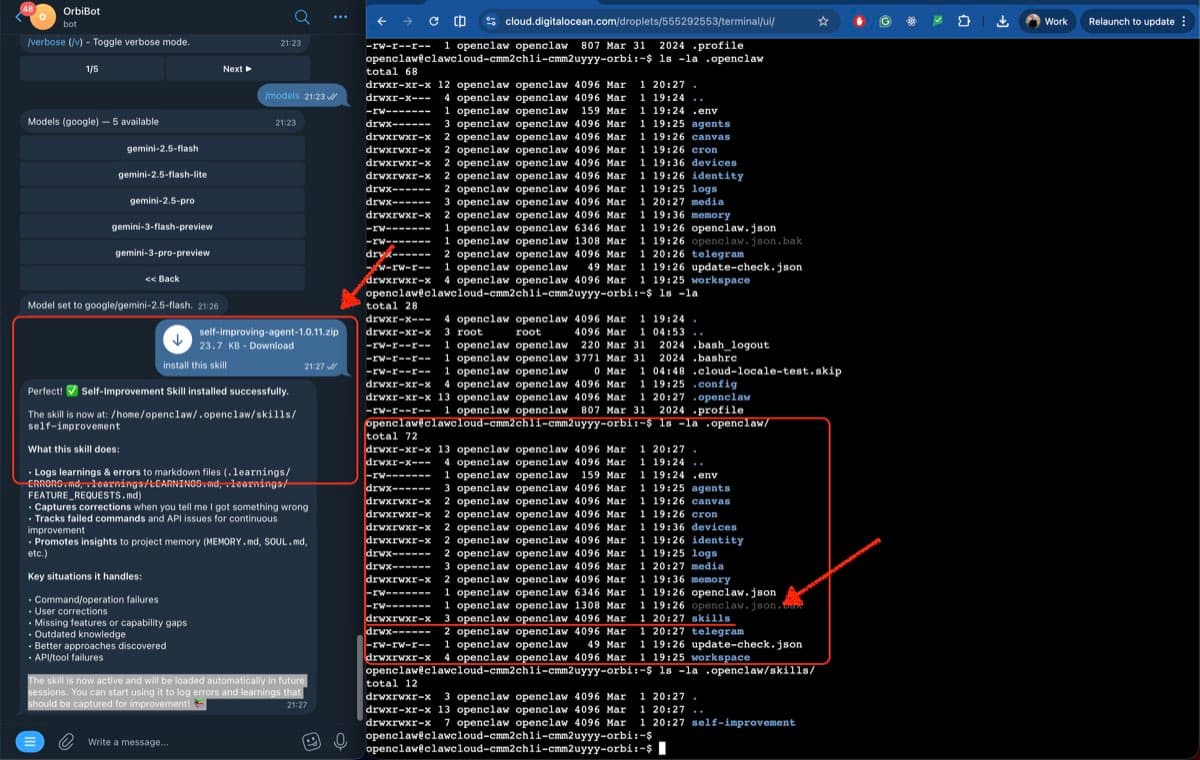
OpenClaw has a skill system that lets you extend what your bot can do without touching the server. You create a folder with a SKILL.md file, zip it up, drop it into your Telegram or Discord chat, and say "install this skill." The bot figures out the rest.
That's the whole flow. It takes about two minutes once you know the format.
What an OpenClaw skill actually is
An OpenClaw skill is an AgentSkills-compatible folder containing a SKILL.md file. The model reads that file as part of its system prompt, which is how it learns new behaviors. When you install a skill, OpenClaw adds it to the list of capabilities the bot checks each session.
The simplest possible skill looks like this:
my-skill/
  SKILL.md
And SKILL.md needs at minimum:
---
name: my-skill
description: What this skill does, in one sentence
---

# My Skill

Instructions for the agent go here. Write them the same way you'd write
a prompt: clearly, concisely, with examples if the behavior is non-obvious.
That's it. The name and description appear in the skills list that gets injected into the agent's context at session start. The body is the actual instruction set.
The drag-and-drop install
Once you have a skill folder, zip it up. Then open your Telegram (or Discord or Feishu) chat with your bot, attach the zip file as a file attachment — drag it in or use the attachment button — and send the message "install this skill". The bot extracts the archive and places the skill folder into ~/.openclaw/skills/. The next session picks it up automatically.
That's all. No SSH, no config edits, no restart.
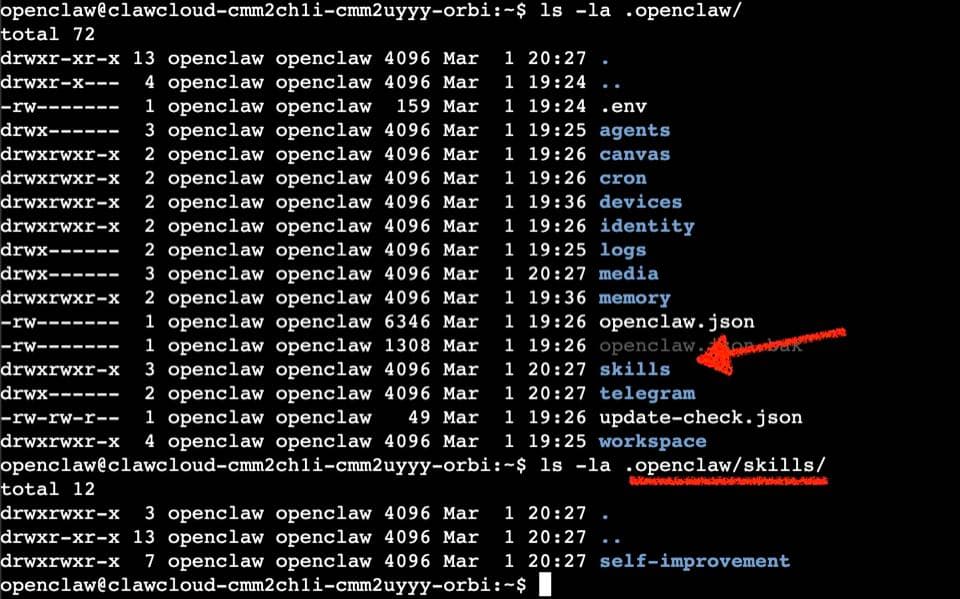
A few things worth knowing:
- Scope: Files land in
~/.openclaw/skills/— the managed/local skills directory, shared across all agents running on the same machine. If you only want a skill active for a specific agent, copy it into that agent's<workspace>/skills/folder instead (default workspace is~/.openclaw/workspace/). - Precedence: The order is:
<workspace>/skills/(highest, agent-specific) →~/.openclaw/skills/(managed/local, shared) → bundled skills (lowest). - Session timing: OpenClaw snapshots eligible skills at session start. A skill installed mid-session takes effect on your next conversation. The skills watcher can also pick up changes automatically within a session.
- Permissions note: The global bundled skills directory inside the OpenClaw npm package requires root to write to. When the bot installs a skill via chat, it lands in
~/.openclaw/skills/instead — a directory theopenclawuser owns. The bot even tells you this: "Couldn't install to the global skills directory... so it's in your user skills folder instead."
Creating a useful skill
Skills are just instructions, so they're flexible. A couple of patterns that work well:
Workflow skills — step-by-step instructions for something the bot does repeatedly. For example, a skill that tells the bot how to handle a weekly digest, how to format code reviews, or how to summarize threads in a specific style.
---
name: weekly-digest
description: Summarizes the week's activity in a fixed format for distribution
---

# Weekly Digest Skill

When asked to create the weekly digest, collect messages from the past 7 days,
group by topic, and format as:

## Week of [date]

**Top discussions:**
- [item] — [one-line summary]

Keep summaries under 15 words each. End with a "Coming up" section if
context mentions upcoming plans.
Tool-gating skills — skills with metadata.openclaw.requires that only load when specific tools or env vars are present. Useful when you want a skill to appear only on certain servers.
---
name: brave-search
description: Search the web using the Brave Search API
metadata: {"openclaw": {"requires": {"env": ["BRAVE_API_KEY"]}}}
---

# Brave Search

Use the Brave Search API at https://api.search.brave.com/res/v1/web/search
when the user asks you to search the web or look something up...
The full list of gating fields — requires.bins, requires.env, requires.config — is documented in the OpenClaw Skills reference.
Installing from ClawHub instead
If you'd rather browse skills someone else has already built, ClawHub is the public registry. Install the CLI, then:
npm i -g clawhub
clawhub search "calendar"
clawhub install <skill-slug>
ClawHub installs into ./skills under your current directory by default (or the configured OpenClaw workspace). The bot picks it up on the next session, same as with a zip install.
To update everything at once:
clawhub update --all
Note: it's clawhub install, not openclaw install. The two CLIs handle different things — openclaw manages the gateway and channels, clawhub manages the skill registry.
Where skills live on a ClawCloud server
On a ClawCloud dedicated server, the openclaw user's home directory persists across restarts. Skills installed to ~/.openclaw/skills/ stay there as long as the server runs. You never lose a skill to a process restart.
This matters more than it sounds. On ephemeral deployments, any file written outside the image gets wiped on redeploy. A skill you installed via chat would disappear. On a dedicated VM, it stays.
If you want to ship skills to a ClawCloud server without using the chat interface, SCP them directly:
# Copy the skill folder to the server
scp -r ./my-skill openclaw@your-server-ip:~/.openclaw/skills/my-skill

# Verify it landed
ssh openclaw@your-server-ip "ls ~/.openclaw/skills/"
Then start a new chat session — OpenClaw picks up the skill automatically. The skills watcher is on by default and monitors ~/.openclaw/skills/ for changes, so in many cases a new session isn't even required.
A note on trust
Skills run as instructions in the agent prompt. A malicious skill can direct the agent to leak information, exfiltrate data from your workspace, or take destructive actions if the bot has elevated permissions. Treat third-party skills the same way you'd treat third-party code — read the SKILL.md before installing, and don't install skills from sources you don't recognize.
ClawHub has a reporting system and moderation workflow, but it doesn't sandbox skill content. The safe path for untrusted inputs is to use sandboxed runs when the skill invokes shell tools. The OpenClaw security guide covers the full threat model.
For your own skills, zip installs via chat are fine — you know exactly what's in them. The bot installing your own skill pack from a zip you built and dropped into Telegram is exactly the use case this feature is designed for. It's just a convenient delivery mechanism for something you already trust.