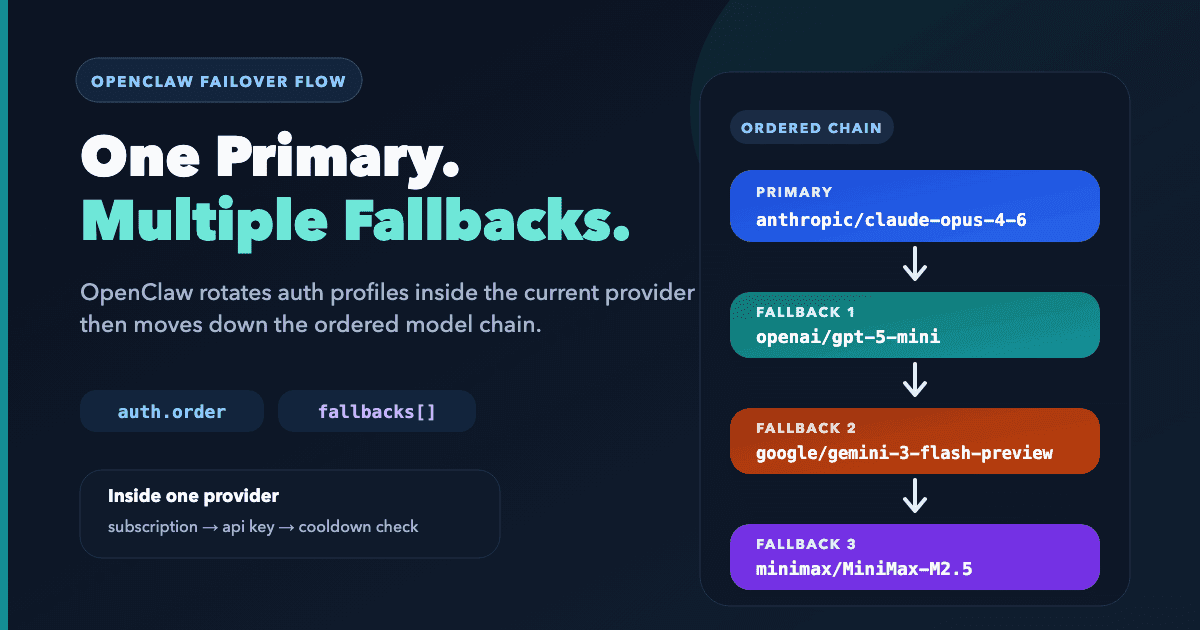
If you want OpenClaw to keep replying when a provider is rate-limited, out of credit, or temporarily unavailable, two controls matter:
auth.orderdecides which saved auth profile OpenClaw tries first inside a provider.agents.defaults.model.fallbacksdecides which model OpenClaw tries after that provider is exhausted.
They solve different problems. auth.order does not choose backup models, and fallbacks does not choose which Anthropic or OpenAI credential to try first. If you have one auth profile per provider, you may not need an explicit auth.order block. Add it when you want a fixed preference instead of the default round-robin behavior.
This guide is based on the official OpenClaw docs for Model Failover, Configuration Reference, Configuration Examples, and Environment. If you want the broader config layout first, start with OpenClaw Configuration: The Settings That Actually Matter.
Where This Helps
- You use BYOK on ClawCloud and want one provider to catch another provider's outage.
- You self-host and want to prefer a subscription or OAuth profile before using an API-key profile.
- You want a lower-cost fallback model after a premium model fails.
- You want fallback between different providers, not just different models from the same provider.
If you use ClawCloud managed mode with one managed key and no extra providers, you probably do not need this. This setup matters more in BYOK and self-hosted deployments.
How OpenClaw Chooses What to Try
The routing order is:
- OpenClaw starts with
agents.defaults.model.primary. - Inside that provider, it checks
auth.order[provider]and tries those auth profiles in order. - If that provider is exhausted, OpenClaw moves to the first item in
agents.defaults.model.fallbacks. - It repeats that auth ordering for the fallback model.
- It continues down the fallback list in order.
Two details matter here:
- OpenClaw pins the chosen auth profile per session. It does not rotate on every request.
- OpenClaw only advances to the next model after auth failures, rate limits, or timeouts exhaust profile rotation. Other errors do not automatically trigger model fallback.
Another important detail from the config reference: auth.profiles and auth.order are metadata and routing only. They are not where raw secrets should live.
OpenClaw stores per-agent auth profiles in ~/.openclaw/agents/<agentId>/agent/auth-profiles.json, and the broader config supports env substitution and SecretRefs. In practice, keep raw keys in ~/.openclaw/.env and use openclaw.json for routing.
Step 1: Put Provider Secrets in .env
If the gateway runs as a service, put keys in ~/.openclaw/.env. The OpenClaw FAQ calls this out because shell exports often do not survive service launches.
# ~/.openclaw/.env
ANTHROPIC_API_KEY=your_anthropic_api_key
OPENAI_API_KEY=your_openai_api_key
MINIMAX_API_KEY=your_minimax_api_key
OpenClaw loads missing variables from the current .env and from ~/.openclaw/.env. Neither file overrides an already-set process variable.
If you want stricter secret handling later, these same config surfaces also support SecretRefs. The routing logic in this guide stays the same.
Step 2: Create Any OAuth or Setup-Token Profiles First
API-key providers can read credentials straight from .env. OAuth and setup-token flows are different: you need to create the profile on the gateway host before auth.order can reference it.
Examples from the official provider docs:
# Anthropic subscription path
claude setup-token
openclaw models auth paste-token --provider anthropic

# OpenAI Codex subscription path
openclaw models auth login --provider openai-codex
If you are starting from scratch with API-key auth, onboarding can also seed the provider auth path:
openclaw onboard --anthropic-api-key "$ANTHROPIC_API_KEY"
openclaw onboard --openai-api-key "$OPENAI_API_KEY"
Stored auth profiles live at ~/.openclaw/agents/<agentId>/agent/auth-profiles.json.
Step 3: Define the Auth Profiles and Their Order
Now tell OpenClaw which saved auth profiles belong to each provider and which should be tried first.
{
  "auth": {
    "profiles": {
      "anthropic:subscription": {
        "provider": "anthropic",
        "mode": "oauth",
        "email": "you@example.com"
      },
      "anthropic:api": {
        "provider": "anthropic",
        "mode": "api_key"
      },
      "openai:default": {
        "provider": "openai",
        "mode": "api_key"
      }
    },
    "order": {
      "anthropic": [
        "anthropic:subscription",
        "anthropic:api"
      ],
      "openai": [
        "openai:default"
      ]
    }
  }
}
In plain English:
- Try your Anthropic subscription profile first.
- If that path is unavailable, try the Anthropic API-key profile next.
- If Anthropic is exhausted for the current model, OpenClaw can move to the next model in
fallbacks.
The easy mistake here is assuming this block creates the credential. It does not. It only names profiles and sets their order, so make sure each provider path already exists in OpenClaw auth storage before you rely on it for failover.
auth.order is per provider. It does not decide when OpenClaw switches from Anthropic to OpenAI. The model chain does that.
If you leave auth.order unset, OpenClaw still rotates profiles. The documented order is: explicit auth.order first, then configured profiles for that provider, then stored profiles, with round-robin behavior when no explicit order is set.
If you prefer using the CLI instead of hand-editing the order block, the official commands are:
openclaw models auth order get --provider anthropic
openclaw models auth order set --provider anthropic anthropic:subscription anthropic:api
openclaw models auth order clear --provider anthropic
Those commands write a per-agent override. Keep the JSON auth.order block if you want a shared default in openclaw.json.
Step 4: Add Your Backup Provider and Model Chain
If every provider you use is built in, you may only need the model block. For a custom or OpenAI-compatible provider, define it under models.providers and pull its secret from .env.
This example uses a direct MiniMax provider as the last-resort fallback:
{
  "models": {
    "providers": {
      "minimax": {
        "baseUrl": "https://api.minimax.io/anthropic",
        "api": "anthropic-messages",
        "apiKey": "${MINIMAX_API_KEY}"
      }
    }
  },
  "agents": {
    "defaults": {
      "models": {
        "anthropic/claude-sonnet-4-6": { "alias": "sonnet" },
        "openai/gpt-5-mini": { "alias": "gpt-mini" },
        "minimax/MiniMax-M2.5": { "alias": "minimax" }
      },
      "model": {
        "primary": "anthropic/claude-sonnet-4-6",
        "fallbacks": [
          "openai/gpt-5-mini",
          "minimax/MiniMax-M2.5"
        ]
      }
    }
  }
}
At runtime, OpenClaw does this:
- Start with
anthropic/claude-sonnet-4-6. - Try
anthropic:subscription. - If needed, try
anthropic:api. - If Anthropic is exhausted for that model, move to
openai/gpt-5-mini. - If OpenAI cannot serve it, move to
minimax/MiniMax-M2.5.
That is the key distinction: auth.order controls profile rotation inside one provider. fallbacks controls the model chain across providers.
Full Example
Put together, it looks like this:
{
  "auth": {
    "profiles": {
      "anthropic:subscription": {
        "provider": "anthropic",
        "mode": "oauth",
        "email": "you@example.com"
      },
      "anthropic:api": {
        "provider": "anthropic",
        "mode": "api_key"
      },
      "openai:default": {
        "provider": "openai",
        "mode": "api_key"
      }
    },
    "order": {
      "anthropic": [
        "anthropic:subscription",
        "anthropic:api"
      ],
      "openai": [
        "openai:default"
      ]
    }
  },
  "models": {
    "providers": {
      "minimax": {
        "baseUrl": "https://api.minimax.io/anthropic",
        "api": "anthropic-messages",
        "apiKey": "${MINIMAX_API_KEY}"
      }
    }
  },
  "agents": {
    "defaults": {
      "models": {
        "anthropic/claude-sonnet-4-6": { "alias": "sonnet" },
        "openai/gpt-5-mini": { "alias": "gpt-mini" },
        "minimax/MiniMax-M2.5": { "alias": "minimax" }
      },
      "model": {
        "primary": "anthropic/claude-sonnet-4-6",
        "fallbacks": [
          "openai/gpt-5-mini",
          "minimax/MiniMax-M2.5"
        ]
      }
    }
  }
}
If you only want provider-internal failover, keep the auth block and shorten the model chain. If you only want cross-provider fallback and each provider has one credential, keep the fallbacks list and simplify auth.
Extra Example: More Than One Fallback
Yes. OpenClaw supports more than one fallback model.
The model docs describe agents.defaults.model.fallbacks as an ordered list. The failover docs say OpenClaw continues down that list after provider-level auth rotation is exhausted.
For example:
{
  "agents": {
    "defaults": {
      "model": {
        "primary": "anthropic/claude-opus-4-6",
        "fallbacks": [
          "openai/gpt-5-mini",
          "google/gemini-3-flash-preview",
          "minimax/MiniMax-M2.5"
        ]
      }
    }
  }
}
Assuming auth is configured for every provider in that chain, OpenClaw will:
- Try
anthropic/claude-opus-4-6first. - Rotate through Anthropic auth profiles based on
auth.orderor the default rotation rules. - Move to
openai/gpt-5-miniif Anthropic is exhausted for failover-worthy errors. - Move to
google/gemini-3-flash-previewif OpenAI is also exhausted. - Move to
minimax/MiniMax-M2.5if Google is also exhausted.
MiniMax still needs its provider config under models.providers.minimax, so longer fallback chains can mix built-in providers with custom-provider entries.
Step 5: Validate the Setup
After editing the config, run the basic checks first:
openclaw config validate
openclaw doctor
openclaw models status
What to look for:
openclaw config validateshould accept the JSON and resolve every${VAR_NAME}reference.openclaw doctorshould show a healthy gateway and surface schema or auth-profile problems.openclaw models statusshould show the resolved primary model, fallbacks, and auth overview OpenClaw can see.
For chat-side verification, send /model status in a conversation. It is the fastest way to confirm which model the current session is using. If you manually pinned a session to another model, clear that override before testing failover. The manual workflow is covered in How to Switch AI Models in OpenClaw.
Under the default hybrid reload mode, OpenClaw hot-applies many safe config changes and restarts for critical ones. If the gateway does not pick up the change, run openclaw gateway restart.
Troubleshooting
OpenClaw never reaches the next provider
That usually means a later auth profile inside the current provider is still working. Check auth.order before you change fallbacks.
Config fails after you add ${MINIMAX_API_KEY}
OpenClaw treats missing or empty env substitutions as config errors. Put the value in ~/.openclaw/.env and validate again.
The gateway ignores keys you exported in your shell
Move them into ~/.openclaw/.env. The FAQ recommends that for service-backed installs.
The current chat keeps using the old model
Check /model status. Session-level model choices can override the default chain until you switch them back.
Official Sources
- Model selection order and ordered fallbacks: Models CLI
- Auth rotation, session stickiness, cooldowns, billing backoff, and fallback behavior: Model Failover
auth.profiles,auth.order, auth storage,agents.defaults.model, and${ENV}substitution: Configuration Reference- Working JSON examples for auth ordering and MiniMax fallback: Configuration Examples
.envprecedence and non-overriding behavior: Environment Variables- FAQ entries for failover, auth profiles, and service-loaded env vars: FAQ
- Auth-profile storage and setup-token or OAuth flows: OAuth
- Provider-specific setup details: Anthropic, OpenAI, MiniMax
For the broader config file structure, see OpenClaw Configuration: The Settings That Actually Matter. If you want a ClawCloud-specific BYOK pattern that layers in backup free models, see OpenClaw Configuration: BYOK, Backup Models, and Free Model Fallback.