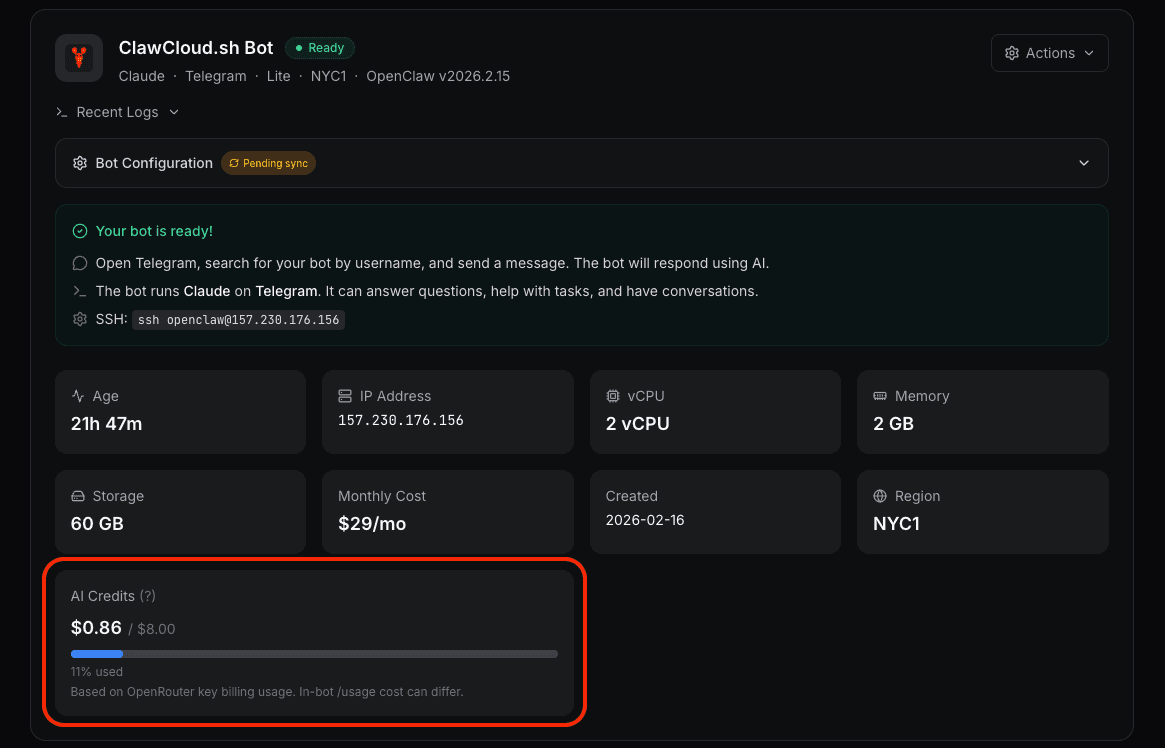
If you run an OpenClaw bot on ClawCloud with the managed AI credits addon, your instance gets a monthly pool of AI credits. You don't need an API key from OpenAI, Anthropic, or Google. ClawCloud handles the AI provider connection, and credits are how you pay for it.
This post covers what credits actually represent, how to track them, and what happens when they run out.
What are AI credits?
Each addon tier comes with a dollar amount of AI credits per billing cycle:
| Addon Tier | Monthly Price | AI Credits |
|---|---|---|
| Small | +$9/mo | $8 |
| Medium | +$28/mo | $25 |
| Large | +$66/mo | $60 |
| XLarge | +$110/mo | $100 |
Credits are measured in dollars spent on AI model API calls. Every message your bot processes costs a small amount — typically between $0.001 and $0.08 depending on the model and conversation length. The credit pool is how much of that usage your addon covers each month.
Under the hood, ClawCloud provisions a dedicated OpenRouter sub-key for your instance with a spending limit matching your credit allotment. OpenRouter routes requests to Claude, GPT, or Gemini depending on which model you selected.
Tracking usage in the dashboard
Your instance dashboard shows a credit usage bar with the current spend and the total available for your billing cycle.
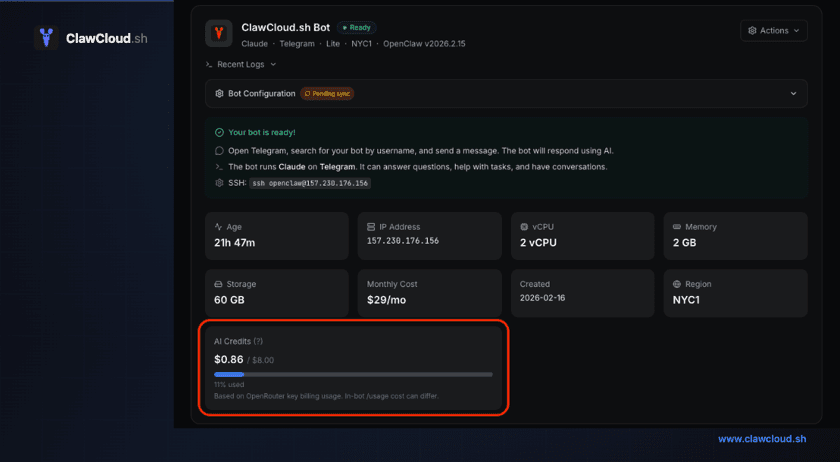
The bar fills up as your bot handles conversations. You can see:
- Dollars used — the actual API cost so far this cycle
- Total available — your plan's credit limit
- Percentage — a quick read on where you stand
Usage updates every few minutes. The number reflects what OpenRouter reports for your instance's key, so it matches your actual API consumption.
Dashboard vs in-bot usage numbers
You might notice that the credit amount in the ClawCloud dashboard doesn't exactly match what your bot reports when you type /usage in Telegram or Discord.
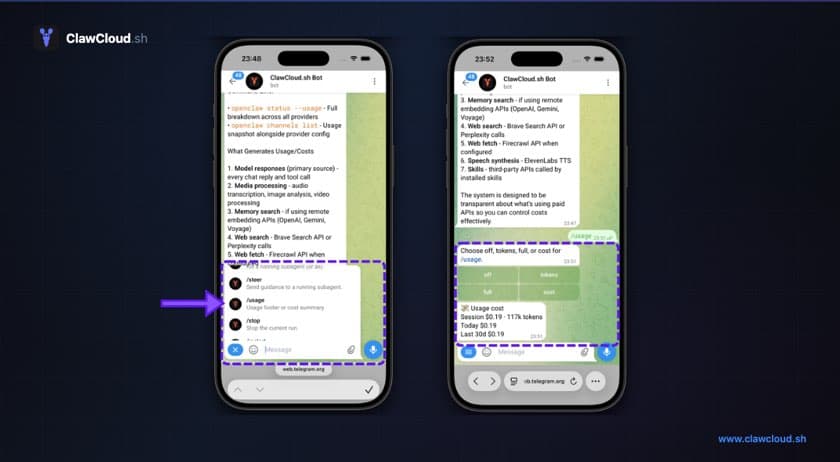
That's normal. The two numbers come from different sources:
- Dashboard credits are based on OpenRouter's billing data. OpenRouter is the payment layer between ClawCloud and the AI provider, and it calculates cost using its own token counting and pricing.
- In-bot
/usageis what OpenClaw tracks locally based on the token counts returned by the model provider in each API response.
The gap is usually small — a few cents over a billing cycle. It happens because OpenRouter and the underlying provider (OpenAI, Anthropic, Google) don't always agree on exact token counts, especially for system prompts and message formatting overhead.
The dashboard number is what matters for your credit limit. That's the number ClawCloud uses to determine whether you've hit the cap.
What happens when credits run out
When your credits hit the limit, paid-model responses stop. If Backup Models is enabled, the dashboard links to a manual free-model switch guide so you can restore service without waiting for reset.
When your next billing cycle starts, credits reset to zero and paid-model responses work again.
How far do credits go?
It depends on the model. Cheaper models stretch the pool further:
| Model | Approx. cost per exchange | Messages on Lite ($8) | Messages on Pro ($25) |
|---|---|---|---|
| GPT-4.1 Mini | $0.002–0.01 | 800–4,000 | 2,500–12,500 |
| Gemini 2.5 Flash | $0.001–0.005 | 1,600–8,000 | 5,000–25,000 |
| Claude Sonnet 4 | $0.02–0.08 | 100–400 | 310–1,250 |
| GPT-4.1 | $0.01–0.05 | 160–800 | 500–2,500 |
These are rough estimates. Actual costs depend on conversation length, system prompt size, and how verbose the AI's responses are. A short "what's the weather?" exchange costs far less than a 20-message debugging session.
For a detailed breakdown of per-model API pricing, see OpenClaw API Costs Explained.
Tips to get more from your credits
Pick the right model for the job. GPT-4.1 Mini and Gemini 2.5 Flash handle most daily conversations at a fraction of the cost of premium models. Save Claude Sonnet or GPT-4.1 for tasks that actually need them.
Keep your system prompt short. The system prompt is included in every API call. A 2,000-token prompt costs you on every single message. Trim it to the essentials — under 500 tokens is a good target.
Ask your bot to be concise. Adding "keep responses under 200 words" to the system prompt cuts output token usage significantly. Output tokens are 3–5x more expensive than input tokens, so shorter responses make a real difference.
Use the /model command to switch mid-cycle. If you're burning through credits faster than expected, your users can type /model gpt-mini or /model gemini-flash in chat to switch to a cheaper model on the fly. Full list of aliases: opus, sonnet, haiku, gpt, gpt-mini, gemini, gemini-flash.
Watch the first week. Check the credit bar during the first few days after deployment to understand your actual usage pattern before the month is over.
BYOK as an alternative
If the credit pool doesn't fit your usage pattern, you can switch to Bring Your Own Key (BYOK) mode. In BYOK, you provide an API key directly from OpenAI, Anthropic, or Google. ClawCloud doesn't track or limit usage — you pay the provider on their billing schedule.
BYOK makes sense if you have high-volume bots, need a specific model not available through OpenRouter, or already have a billing relationship with a provider. For everyone else, managed credits mean one subscription and zero API key management.
Credits reset and service behavior
The managed AI credit system is designed to keep things simple. You pick a plan, deploy a bot, and the credits handle the AI costs. The dashboard shows exactly where you stand. If you hit the limit, the dashboard warns you and, with Backup Models enabled, you can switch to a supported free model manually (degraded quality/speed) or wait for reset. Next billing cycle, everything resets.
No surprise invoices from three different AI providers. No API key rotation. Just a credit bar and a bot that works.