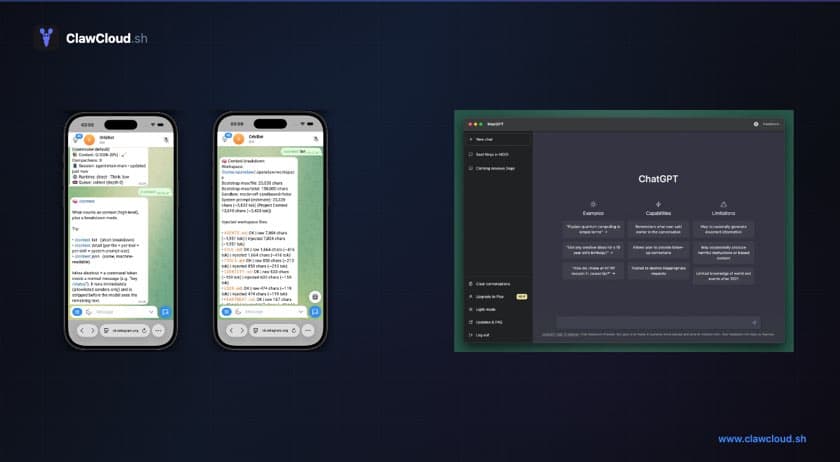
Is ChatGPT private?
ChatGPT stores your conversations on OpenAI's servers. By default, your chats can be used to improve OpenAI's models unless you opt out. Even with opt-out enabled, the conversations still pass through OpenAI's infrastructure.
That is not necessarily a problem. For most people, it is an acceptable trade-off for a polished, free interface. But for people who want a private ChatGPT — where their history stays on infrastructure they control and their API key belongs to them — the standard setup is not the right fit.
OpenClaw is the alternative those people are looking for.
What people are actually looking for
When someone searches for a private ChatGPT, they tend to want one or more of these: chat history off shared consumer servers, control over which model handles their data, or an assistant that lives in the apps they already use rather than a browser tab.
OpenClaw fits all three. Conversations store as plain files on a dedicated server that belongs to your account. You configure the API key and the model. The bot lives in Telegram or Discord.
Lately the same question appears with a different framing: "openclaw alternative" — usually from someone who's heard of OpenClaw and wants to know if it replaces ChatGPT, Claude, or Gemini, or works alongside them. The honest answer is it works alongside them. OpenClaw is the runtime that puts those models into your messaging app.
What OpenClaw gives you that ChatGPT doesn't
OpenClaw is open-source software that runs as a bot inside Telegram, Discord, WhatsApp, and many other channels. You configure it, it runs on a server you control, and it uses whichever AI model you choose.
Your own model, not theirs. ChatGPT exposes GPT-4o and a few variants. OpenClaw connects to Claude, GPT, Gemini, and dozens of models — your choice, changeable at any time with a /model command.
Lives in your chat app. ChatGPT requires opening a browser and switching contexts. OpenClaw lives in Telegram or Discord, where you probably already spend time. You message it like a contact.
Your server, your data. Conversations stay on a dedicated server provisioned for your account. They do not pass through a shared platform with its own retention and privacy policies.
Group chat support. You can add your OpenClaw bot to a Discord server or Telegram group. It responds to everyone or only when mentioned. ChatGPT has no equivalent for this.
Browser AI vs desktop AI vs OpenClaw: a plain comparison
| ChatGPT (browser) | Claude.ai (browser) | OpenClaw on ClawCloud | |
|---|---|---|---|
| Where it lives | Browser tab | Browser tab | Telegram, Discord, or other channels |
| Chat history | OpenAI's servers | Anthropic's servers | Your dedicated server |
| API key | Platform's key | Platform's key | Your key, or managed credits |
| Group chat | No | No | Yes (Telegram groups, Discord servers) |
| Model choice | GPT family only | Claude family only | Claude, GPT, Gemini, and more |
| Always-on | When you open it | When you open it | 24/7 on dedicated infrastructure |
| Monthly cost | Free or $20+ | Free or $20+ | From $29/mo |
OpenClaw vs Claude
Claude.ai is a web product. Anthropic has a capable API and iOS and Android apps, but there's no official Telegram or Discord bot — Claude lives in a browser, not a chat channel.
If you route Claude through OpenClaw, you get Claude Sonnet 4 or Opus as a Telegram or Discord bot. The model is the same; the interface is different. Most OpenClaw users on the managed credits tier run it this way.
This is also where "openclaw alternative" flips. If you want a Claude bot in Telegram, OpenClaw isn't an alternative to Claude — it's the only practical way to get there.
OpenClaw vs Gemini
Gemini is Google's model family: web app, Google Workspace integration, API via Google AI Studio. Like Claude, there's no official Telegram or Discord bot.
OpenClaw supports Gemini natively. Add your Google AI Studio API key, pick a Gemini model, and it works like any other provider. Requests go to Google's API; conversations stay on your server.
For people already using Gemini through Workspace or the web app, OpenClaw is what moves it into your messaging app.
DeepSeek and Qwen too
OpenClaw isn't limited to the big three. ClawCloud's managed catalog includes DeepSeek (R1, V3.2, Chat V3.1), Qwen (Qwen3 Max, Qwen3 Coder, Qwen3 Coder Plus), and free-tier options for both: deepseek/deepseek-r1-0528:free and qwen/qwen3-coder:free. These cost zero credits.
DeepSeek R1 is strong at reasoning tasks. Qwen3 Coder handles code well. Both are cheaper per token than Claude or GPT equivalents, which makes them practical choices if you're watching credit usage. See the full breakdown of DeepSeek and Qwen on ClawCloud for model IDs and switching instructions.
The trade-offs
Being honest: ChatGPT is still the right call in some situations.
If you want zero setup, ChatGPT's free tier works immediately. If you're using the Advanced Voice Mode, Code Interpreter, or DALL-E, those are ChatGPT-specific features OpenClaw doesn't replicate.
OpenClaw also requires a bot token from Telegram or Discord — creating one takes about 2 minutes but it's still a step. And the server costs $29/month minimum, which is more than ChatGPT Free.
What you're trading is convenience for control.
The setup problem: why most people don't run their own
Self-hosting OpenClaw is possible but not simple. You need Node.js, a server, config files, and some debugging tolerance. The self-hosting difficulty post covers this in detail.
ClawCloud solves the setup problem. It's managed hosting for OpenClaw — you pick a plan, paste a bot token, select a model, and your bot is live in under a minute. The server management, updates, and infrastructure are handled automatically.
Which plan makes sense
If you're switching from ChatGPT Plus ($20/month), the Lite plan ($29/month) is the most direct comparison. It covers Telegram and Discord on a dedicated server. Add the Small managed credits addon (+$9/month, $8 budget) for light to moderate use with budget models, or bring your own API key.
For heavier use or if you want to run a more capable model like Claude Sonnet 4 or GPT-4.1, the Pro plan ($49/month) with the Medium credits addon (+$28/month, $25 budget) covers moderate daily use on premium models.
You can also bring your own API key (BYOK) if you already have an Anthropic, OpenAI, or Google account — in that case, your own key handles billing directly and you skip the managed credit system.
See the credits guide for a full breakdown of what's included.