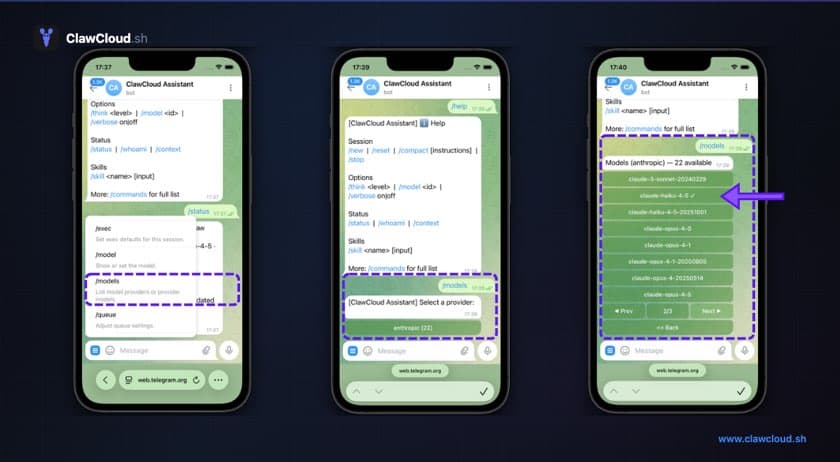
When you deploy an OpenClaw bot on ClawCloud, you pick one AI model. Claude Sonnet, GPT-4.1, Gemini Flash, whatever fits your use case. Until now, that was the only model your bot could use.
That felt limiting. If you deployed with Claude Sonnet and wanted to try Opus for a harder question, you had to go into the dashboard and change the primary model. Then change it back. Not terrible, but annoying enough that most people just stuck with their initial choice.
What changed
Every OpenClaw bot on ClawCloud now has access to every model from the provider you selected during deployment. If you chose an Anthropic API key, your bot can use all 22 Anthropic models. OpenAI key? All 36 models. Google? All 21.
If you want the current curated catalog for managed mode, BYOK limits, and Backup Models, see OpenClaw Models.
Need to tune behavior alongside model changes? Use OpenClaw group chat settings. Deciding between managed credits and BYOK first? Compare OpenClaw Hosting.
You don't need to do anything. The catalog was applied automatically to all existing bots. New deployments get it out of the box.
Using model aliases
OpenClaw supports a /model command that lets you switch models mid-conversation. The full model names work (anthropic/claude-opus-4-6), but typing those out gets old. So we added short aliases for the models people use most:
| Alias | Model |
|---|---|
opus | anthropic/claude-opus-4-6 |
sonnet | anthropic/claude-sonnet-4-5 |
haiku | anthropic/claude-haiku-4-5 |
gpt | openai/gpt-5.2 |
gpt-mini | openai/gpt-5-mini |
gemini | google/gemini-3-pro-preview |
gemini-flash | google/gemini-3-flash-preview |
Type /model haiku to switch to a cheaper, faster model for quick questions. Switch to /model opus when you need the heavy hitter. The alias resolves to the latest version of that model family, so you don't have to track version numbers.
Aliases only work for models within your provider. If you deployed with an Anthropic key (BYOK mode), /model gpt won't work since your API key can't authenticate with OpenAI. Managed-mode users can switch across all providers since everything routes through OpenRouter.
Why this matters for cost
Different models have different price points. With the full catalog available, you can match the model to the task instead of paying top-tier pricing for everything.
A quick factual question? Use Haiku or GPT-mini. Writing something long and nuanced? Switch to Opus or GPT-5-pro. The API costs scale with the model's capability, and now you can be selective about it.
Our API costs breakdown covers the per-model pricing in detail.
The full lists
Here's what's available per provider:
Anthropic (22 models): Claude 3 Haiku through Claude Opus 4.6, including all Sonnet and Opus variants.
OpenAI (36 models): GPT-4 through GPT-5.3, including the o-series reasoning models (o1, o3, o4-mini), Codex models, and Pro/Deep Research variants.
Google (21 models): Gemini 1.5 through Gemini 3 Preview, including Flash, Flash Lite, Pro, and Live variants.
Your primary model (the one you picked during deployment) is always included, even if it somehow isn't in the default catalog.
No action needed
If your OpenClaw bot is already running, the catalog is there. If you deploy a new one, it's included automatically. The update doesn't change your primary model, your DM policy, or anything else about your bot's configuration.
For the current catalog overview, see OpenClaw Models. For a step-by-step guide on switching OpenClaw models in conversation, see How to switch AI models.