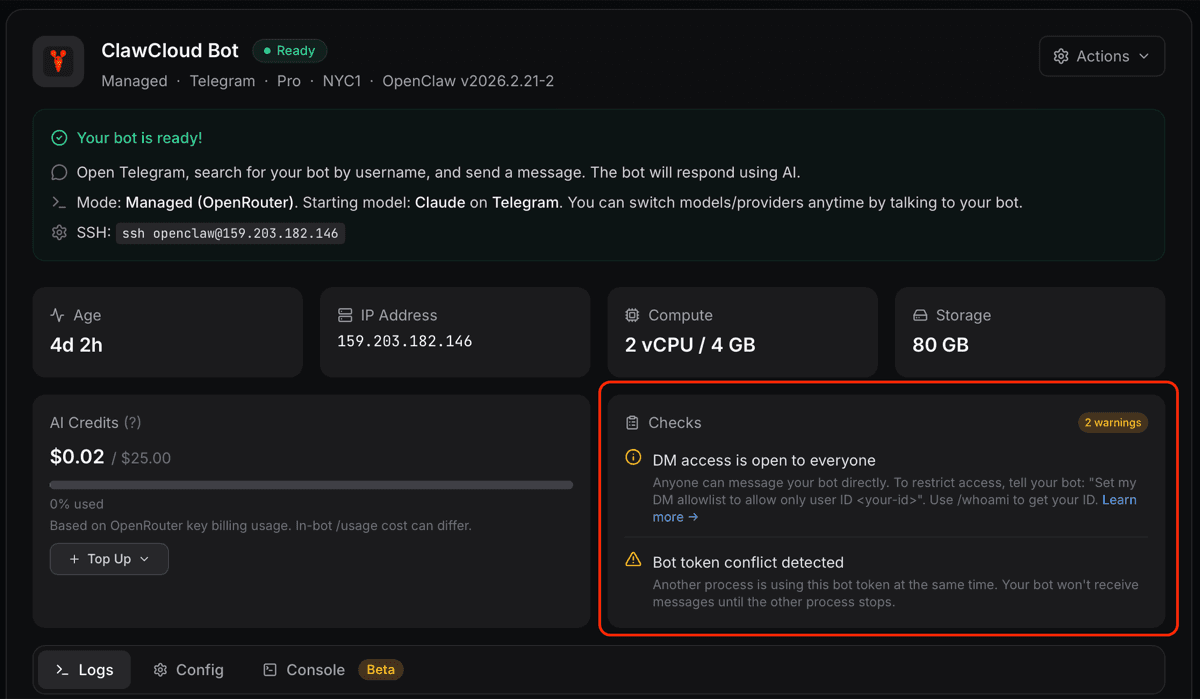
The ClawCloud dashboard surfaces health checks reported directly by your instance's agent. When your bot detects a problem, a notice appears at the top of the instance panel — no SSH required to find out what's wrong.
How the checks work
The Checks panel polls your instance every 10 seconds. Each poll asks the agent on your server to scan the last 40 lines of the OpenClaw gateway log for known error patterns. Checks that find a problem are returned as notices with a severity level (warning or info). They appear and clear automatically — no page reload needed.
Channel conflict
What you'll see: A yellow warning — "Bot token conflict detected."
This means another process is calling getUpdates on the same bot token at the same time as your OpenClaw instance. Only one polling process can hold a Telegram bot token at a time, so your bot stops receiving messages.
Common causes:
- A local instance running on your laptop during testing
- A previous deployment that wasn't fully stopped
- Another person using the same bot token
Fix: Stop the competing process. You can also clear the conflict by opening this URL in your browser (replace <TOKEN> with your bot token):
https://api.telegram.org/bot<TOKEN>/deleteWebhook?drop_pending_updates=true
After that, go to the ClawCloud dashboard and use the Restart Gateway action to reconnect.
DM access restricted
What you'll see: A blue info notice — "DM access restricted."
Your bot's DM policy is set to pairing mode. Anyone messaging the bot directly gets "You are not authorized." until they're paired.
Fix: Open the Settings tab on your instance and enable DM access, or use the Unlock DM Access action from the instance actions menu. See how to unlock OpenClaw DM access for the full steps. To change the DM policy proactively, see How to Change the OpenClaw DM Policy.
Free model active
What you'll see: A blue info notice — "Free model active."
Your instance is currently running on a free model. This can happen if the plan's included credits were fully used before the next billing cycle reset, or if you manually switched to a free model.
Free models are rate-limited and may respond more slowly. To switch back, go to the Settings tab and pick a paid model. If your credits are exhausted, the switch takes effect immediately once they reset. See OpenClaw model tiers and free models for more.
Notices clear automatically
Notices don't require any manual dismissal. The Checks panel re-polls every 10 seconds, so once the underlying condition is gone — the conflict stops, DM access is re-opened, the model switches — the notice disappears on its own within a few seconds.