Deploy OpenClaw
under 1 minute.
Skip the servers and setup scripts. Pick Linux or Windows, choose your AI model, connect a channel, and your assistant is live on a dedicated cloud server, online 24/7. Deploy as many instances as you need.
Linux from $29/mo or Windows from $49/mo · Unlimited instances · No DevOps · Cancel anytime
Bring your own API key or add managed AI credits — no separate provider account needed
Three steps. Under a minute.
No servers to configure. No terminal commands. No DevOps.
Pick your AI model
100+ curated AI models — Claude, GPT, Gemini, DeepSeek, Mistral, Llama, Grok, and more. Bring your own key or add managed AI credits.
Connect a channel
Telegram, Discord, or Feishu. Scan QR or paste a token.
Click Deploy
Your OpenClaw launches on a dedicated cloud server. Linux is typically ready in about 5 minutes, Windows in about 15.
Traditional Method vs ClawCloud
Setting up OpenClaw manually takes 45+ minutes of terminal work. We handle the server setup so you can launch in minutes.
See detailed comparison →Traditional
Manual setup
ClawCloud
One-click deploy
Pick a model, connect a channel, deploy — done.
Servers and environment are pre-configured and waiting.
A full dashboard, not just a deploy button.
Monitor, configure, and troubleshoot your OpenClaw bot from the browser. Automatic issue detection flags problems before you notice them. No SSH required.
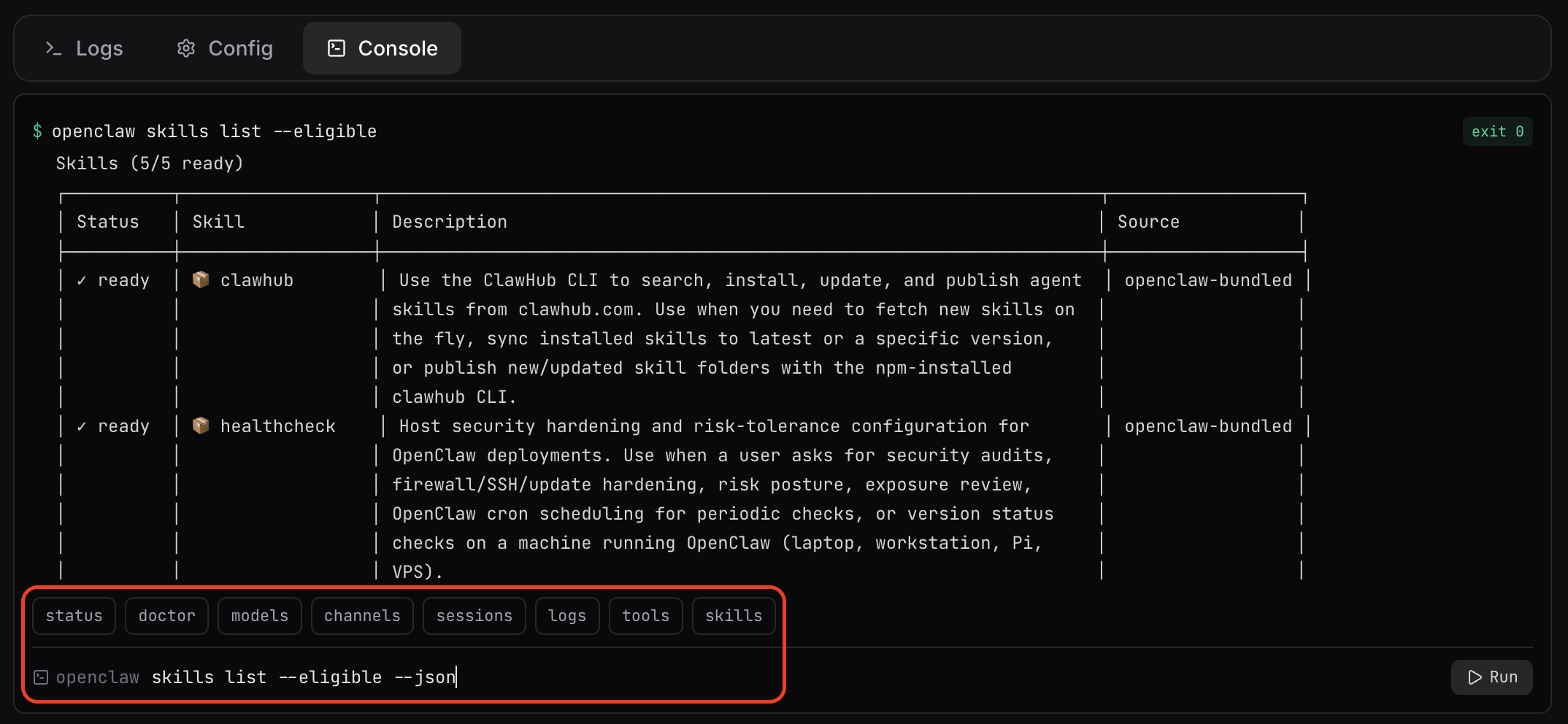
The Console tab gives you direct access to the OpenClaw CLI on your server. Run health checks, switch models, inspect channels, and manage DM policies without ever opening a terminal.
- Quick-command buttons for common tasks (status, doctor, models, logs)
- Full command history with arrow-key navigation
- Color-coded exit status for every command
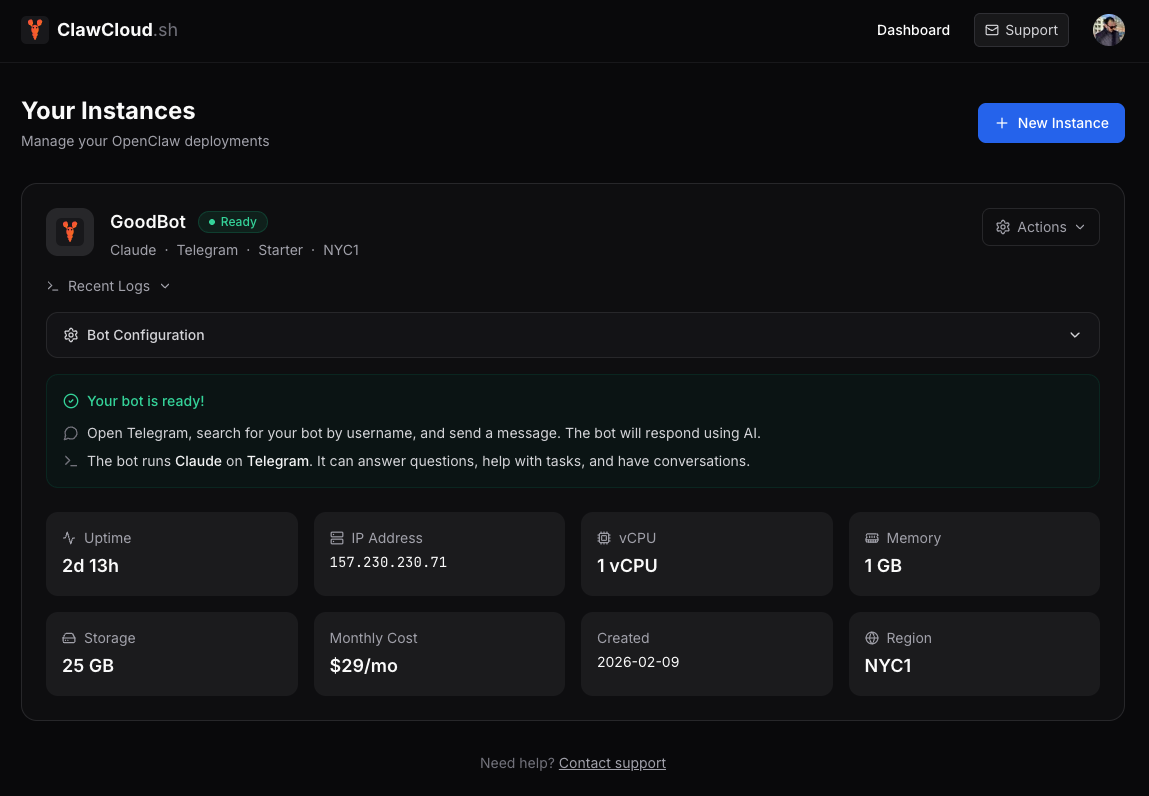
The dashboard continuously monitors your instance and shows its current state: Ready, Deploying, Degraded, or Error. If your bot goes down, the dashboard detects it automatically and shows exactly what went wrong.
- Green/amber/red badges update in real time
- Auto-recovery when degraded instances come back online
- API key health checks for managed-mode instances
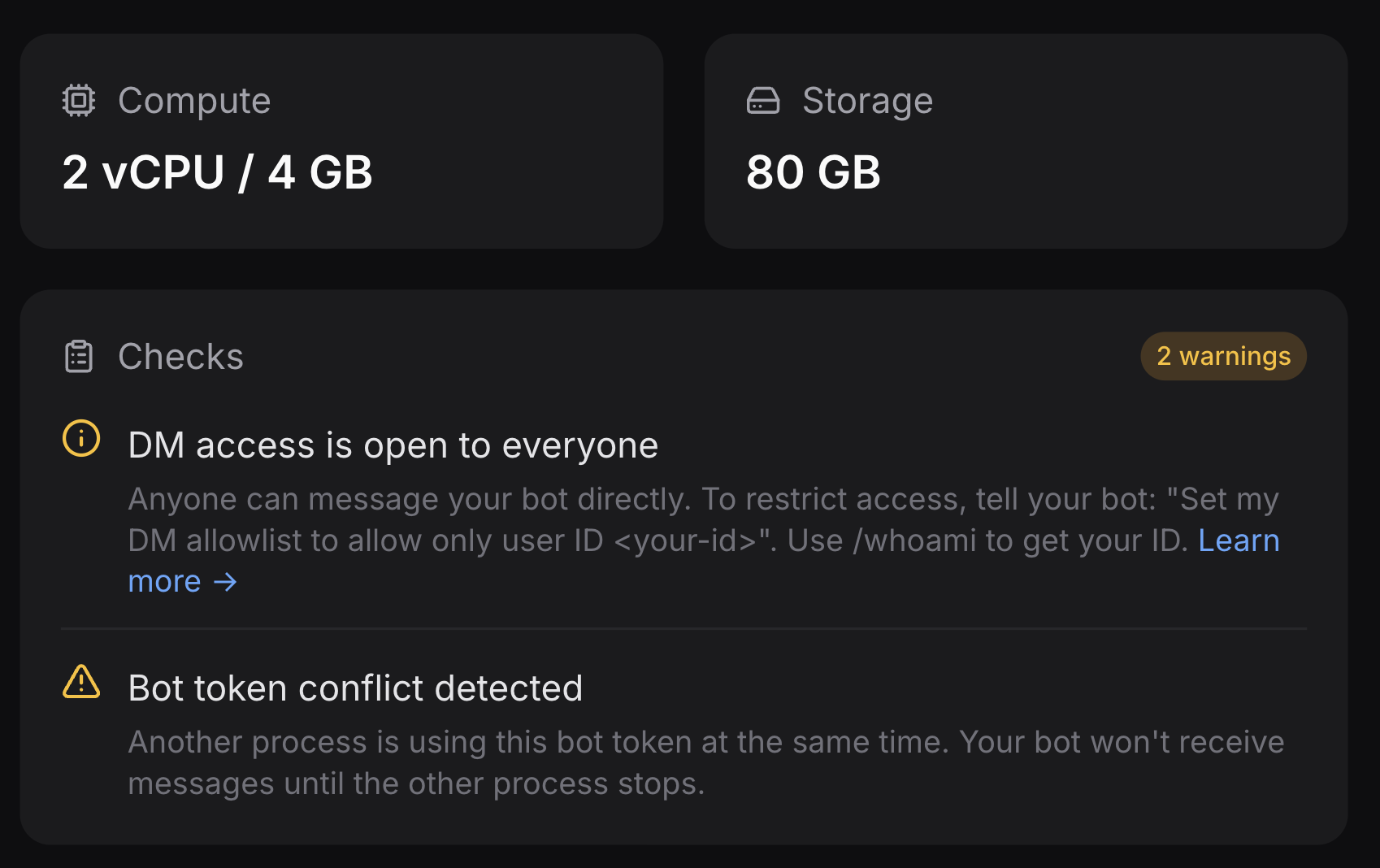
Starting with agent v1.5.3, your instance scans the OpenClaw gateway log every 10 seconds and reports known problems directly in the dashboard. Warnings appear and clear automatically — no page reload, no SSH, no grep.
- Channel conflict detection — flags when another process holds your bot token (Telegram 409 errors)
- DM access restriction notice — one-click fix if your bot is in pairing mode
- Free-model warning — highlights when your bot is running on a free model so you know quality and speed may be lower
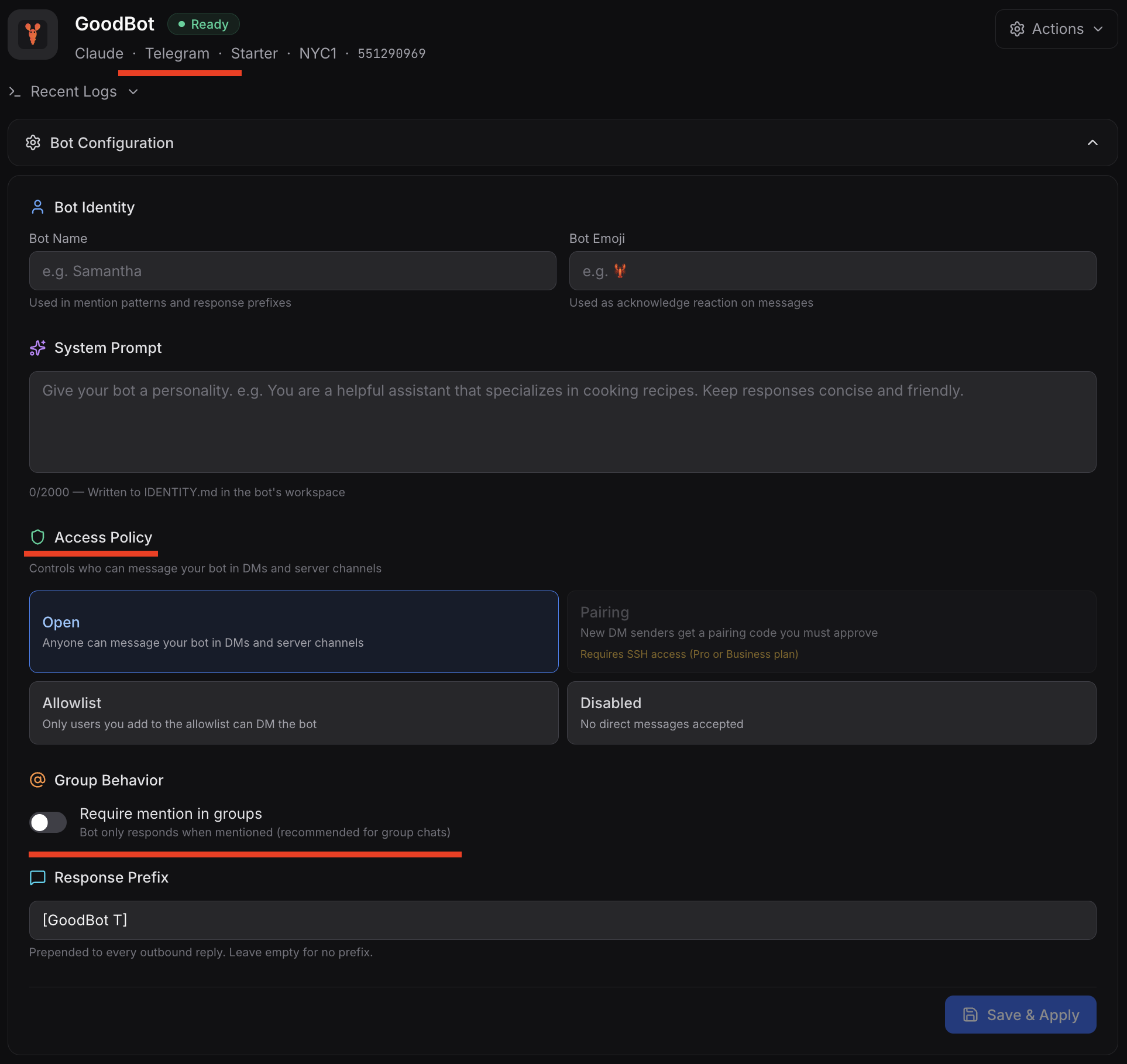
The Config tab pulls live configuration directly from your running server. View the bot's name, system prompt, active model, DM policy, allowlist, and group behavior settings — all read-only, always up to date.
- Bot identity: name, personality, system prompt
- Channel and DM policy per platform (Telegram, Discord, Feishu)
- Group mention behavior and trigger patterns
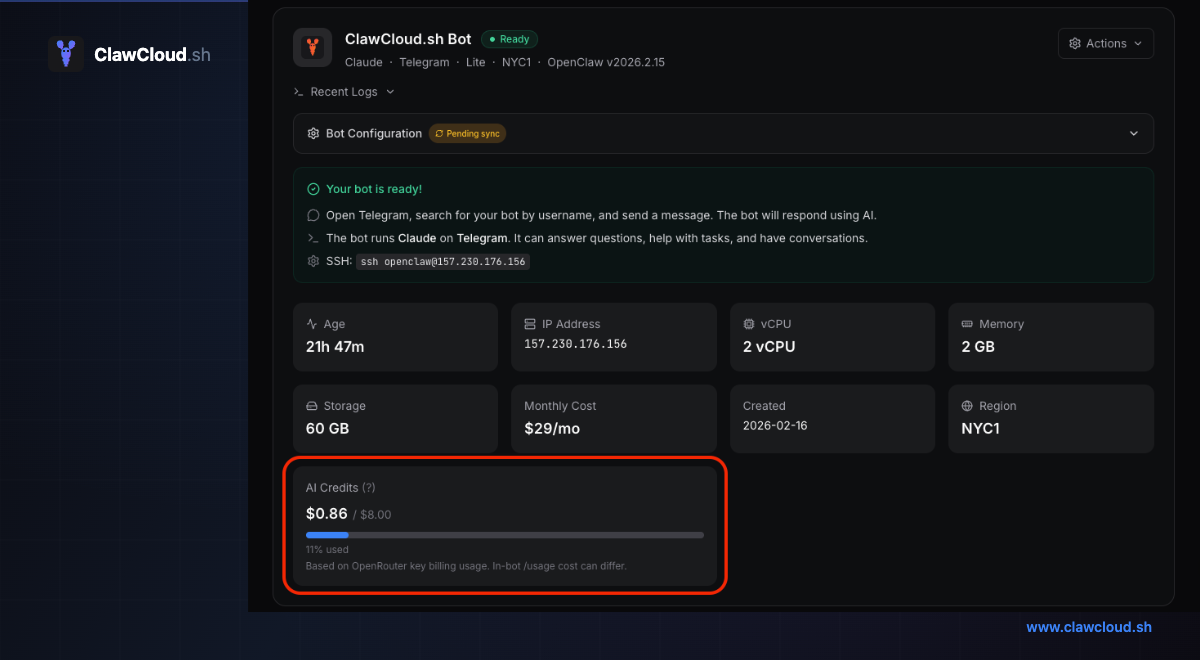
For managed-mode instances, the dashboard shows a real-time credit usage bar. See exactly how much of your monthly budget is consumed, and get a clear warning when credits are running low.
- Usage bar with color-coded thresholds (green → amber → red)
- Credits reset automatically on each billing cycle
- BYOK mode skips credit tracking — use your own key with no limits
The Logs tab streams recent entries from the OpenClaw gateway service journal. Useful for debugging connection issues, model errors, or channel problems.
- Last 50 journal lines from the running gateway
- One-click refresh without page reload
- Pair with the Console for advanced troubleshooting
The Actions menu gives you server-level controls: reboot, power on/off, reload gateway, unlock DM access, and destroy. The "Unlock DM Access" button is a safe recovery tool if you accidentally lock yourself out of your bot.
- Reboot and power controls with confirmation prompts
- One-click DM unlock — resets policy without touching other config
- Destroy controls with confirmation and clear state tracking
Everything included. Nothing to manage.
Dedicated Cloud Server
Your own isolated VM. Not shared, not throttled.
Auto-Updates
OpenClaw stays up to date automatically. Zero downtime.
Online 24/7
Your AI assistant stays available even when your laptop sleeps.
Current Channels
Telegram, Discord, and Feishu are supported today. More channels are planned.
Linux or Windows Access
Choose SSH with headless browser support on Linux or a full RDP desktop on Windows.
Daily Backups
Automatic backups. Restore with one click if anything goes wrong.
Simple pricing. No surprises.
Start at $29/mo on Linux or $49/mo on Windows. Pick your platform here, then tick yearly pricing if you want to compare the annual discount.
- 1 OpenClaw instance
- Bring your own key (BYOK) or add managed AI credits
- 100+ curated AI models (Claude, GPT, Gemini, DeepSeek, Mistral, and more)
- Optional Backup Models addon — supported free models ready as a manual backup
- Telegram, Discord, Feishu
- SSH access
- Auto-updates
- Base support (48h response)
- 1 OpenClaw instance
- Bring your own key (BYOK) or add managed AI credits
- 100+ curated AI models (Claude, GPT, Gemini, DeepSeek, Mistral, and more)
- Optional Backup Models addon — supported free models ready as a manual backup
- Telegram, Discord, Feishu
- Auto-updates + daily backups
- Priority support (24h response)
- SSH access
- 1 OpenClaw instance
- Bring your own key (BYOK) or add managed AI credits
- 100+ curated AI models (Claude, GPT, Gemini, DeepSeek, Mistral, and more)
- Optional Backup Models addon — supported free models ready as a manual backup
- Telegram, Discord, Feishu
- 4 vCPU — handles heavy traffic and long conversations
- Auto-updates + daily backups
- Hourly backups — add as addon
- Premium support (8h response)
- SSH access
Common questions
Quick answers to the objections people usually have right before they deploy.
Do I need technical skills?
No. The deploy wizard handles everything. If you can create a Telegram, Discord, or Feishu bot (which takes about 2 minutes), you can deploy on ClawCloud.
Should I choose Linux or Windows?
Choose Linux if you want the lower starting price and prefer SSH or a CLI-first workflow. Choose Windows if you want a desktop environment, RDP access, browser-based setup, or admin control from a familiar GUI.
Do I need my own API keys?
No. Add the managed AI credits addon and start immediately — no API key required. If you prefer to use your own key from OpenAI, Anthropic, or Google, you can use bring-your-own-key (BYOK) mode instead.
Can I cancel anytime?
Yes. No contracts, no cancellation fees. Cancel from your dashboard and your subscription ends at the end of the billing period.
Stop configuring. Start using.
Your personal AI assistant, online 24/7 on a dedicated cloud server, reachable from the chat app you use.
Deploy Your OpenClaw Now