Setting up an AI chatbot usually involves creating accounts with AI providers, generating API keys, configuring billing, and hoping you pasted the right key in the right field. We wanted to skip all of that.
What managed AI means
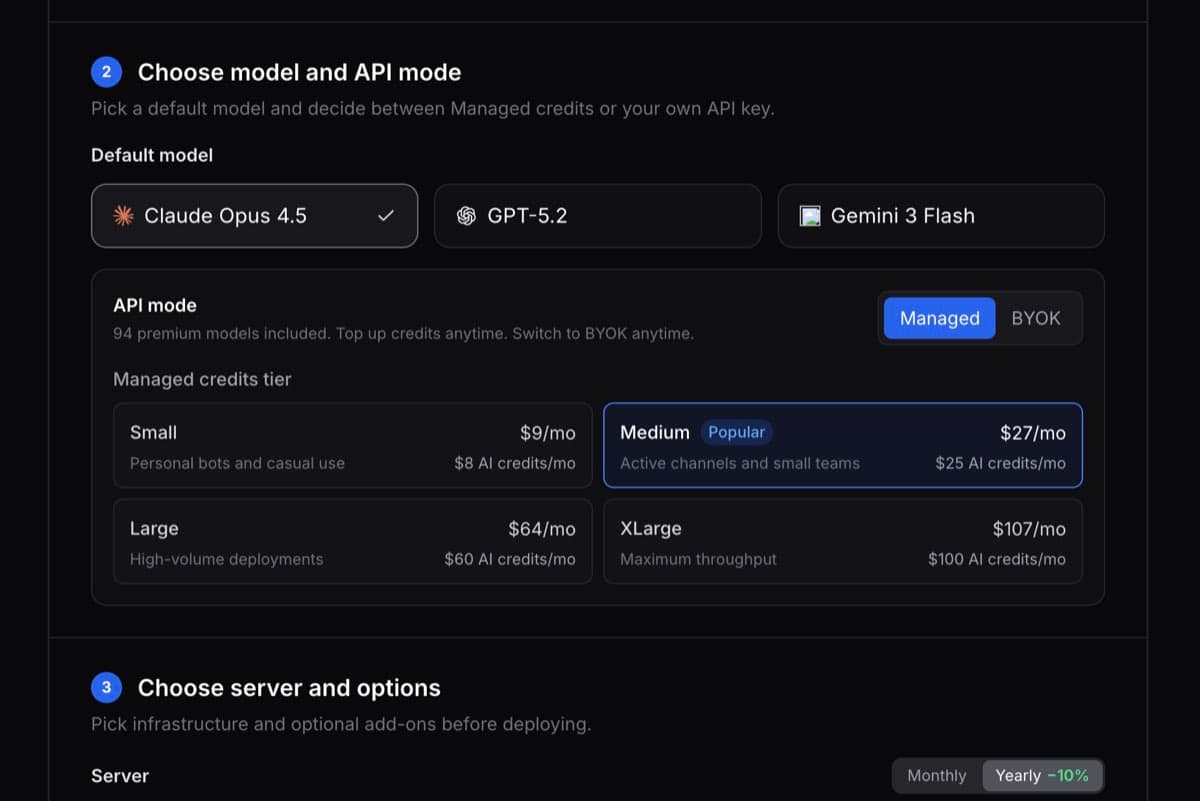
When you deploy an OpenClaw bot on ClawCloud, the default mode is "managed." That means ClawCloud handles the AI connection for you. You pick Claude, GPT, or Gemini in the deploy wizard, keep the suggested credits tier or choose another one, and your bot gets a working AI backend immediately.
No OpenAI account. No Anthropic dashboard. No Google Cloud console. You don't touch an API key at any point.
How it works under the hood
Each managed instance gets its own dedicated AI key managed by ClawCloud. That single connection lets your bot switch between Claude, GPT, and Gemini without any reconfiguration.
The key has a spending limit that matches your selected credits tier. Once deployed, ClawCloud monitors usage and shows credit tracking in the dashboard. If credits run out, the dashboard warns you and links to the manual switch guide. With Backup Models enabled, you can move to a supported free model in chat until credits reset.
How pricing works
You pay for two things:
- The server plan: Lite $29/month, Pro $49/month, Max $109/month
- Optional managed AI credits: billed as a separate addon on the same checkout
| Credits tier | Monthly price | AI credit budget |
|---|---|---|
| Small | +$9 | $8 |
| Medium | +$28 | $25 |
| Large | +$66 | $60 |
| XLarge | +$110 | $100 |
The deploy wizard suggests Small for Lite, Medium for Pro, and Large for Max by default, but you can change the tier before checkout.
Managed mode starts with cost-efficient defaults: GPT-4.1 Mini for GPT, Gemini 2.5 Flash for Gemini, and Claude Haiku 4.5 for Claude. You can switch models later with /model, and all usage comes from the same credit pool.
Credits reset and exhaustion flow
Credits reset at the start of each billing cycle. If your bot hits the limit mid-cycle, paid-model responses stop until you switch to a supported free model manually (with Backup Models enabled) or wait for reset. The dashboard shows a clear exhaustion warning and links to the switch guide.
The dashboard shows a color-coded credit bar so you can see where things stand at a glance.
You can still bring your own key (BYOK)
Managed mode is the default, but it's not the only option. During deployment, you can expand the "Bring your own key" section and enter an API key from OpenAI, Anthropic, or Google directly. In BYOK mode, ClawCloud doesn't track or limit your AI usage — you pay your provider separately.
BYOK is there for users who expect heavy traffic, want direct provider billing, or need tighter control over their AI setup. For everyone else, managed mode means one checkout, one bill, and zero API key management.
Try it
Pick a plan, connect a channel, choose a model. Your bot is live in under two minutes with AI that works out of the box. Check out the managed AI guide for a deeper look, or jump straight to deployment.