For a conversion-focused overview of Discord bot hosting options, see OpenClaw Discord Bot Hosting.
OpenClaw Discord Bot Hosting (Support Terms)
If you searched for openclaw discord bot hosting, deploy openclaw discord bot, or openclaw discord bot setup, this page covers the fastest deployment path on ClawCloud.
Why self-managed Discord bots slow teams down
Discord bots need a server that's always on. If you're running OpenClaw on your local machine, the bot disconnects every time you close your laptop. Self-hosting on a VPS means provisioning a server, installing Node.js, configuring OpenClaw, managing a Discord application in the Developer Portal, and keeping everything updated.
People regularly spend entire weekends getting this working, only to have it break after an update.
How ClawCloud deployment works
ClawCloud deploys your Discord bot on a dedicated cloud server in under a minute:
- Pick your AI model — Claude, GPT, or Gemini.
- Paste your Discord bot token — Create an application in the Discord Developer Portal, add a bot, copy the token.
- Click Deploy — Your bot is live and ready to respond.
Your Discord bot runs 24/7 on its own server. No SSH is required.
What you can do with a Discord OpenClaw bot
- Server assistant — Add the bot to your Discord server and let members ask it questions, get summaries, or generate content.
- Moderation helper — Use it to draft responses, summarize long threads, or translate messages.
- Study group tool — Deploy a bot that helps with research, explains concepts, and generates practice questions.
- Dev team companion — Have the bot answer technical questions, review code snippets, or brainstorm architecture decisions.
How to get your Discord bot token
Need help setting up a Discord application? Check our Discord bot setup guide.
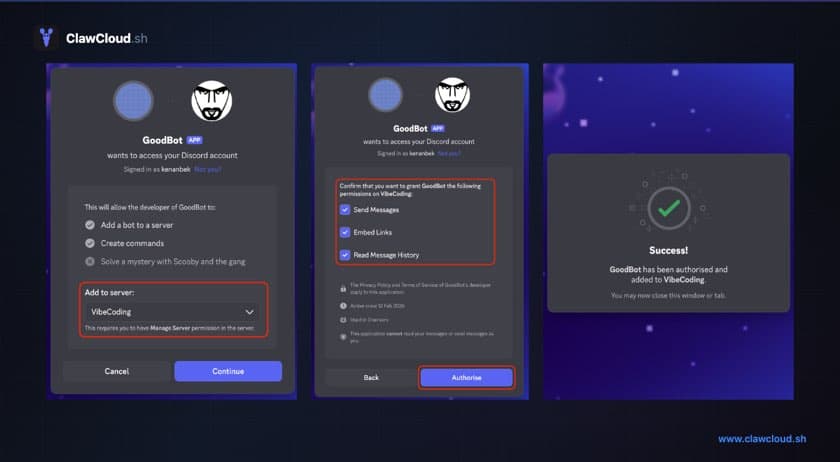
Short version: Go to the Discord Developer Portal, create a new application, add a bot, and copy the token. Then invite the bot to your server using the OAuth2 URL generator with bot and applications.commands scopes.
What to do after deploy
- How to Configure OpenClaw Group Chat Behavior
- How to Change the OpenClaw DM Policy
- How to Switch AI Models on Your OpenClaw Bot
Pricing and plans
All ClawCloud plans support Discord. Lite starts at $29/month and includes a dedicated server, auto-updates, and SSH access. Add managed AI credits or bring your own key.
Start directly with Discord preselected: Deploy OpenClaw on Discord.